curl – resolving error – curl : The remote name could not be resolved: ‘–help’

Hi All,
Greetings for the day 🙂 LIFE IS BEAUTIFUL 🙂
Today again new issue and solution 🙂
Since working on curl for executing SharePoint REST API. Exploring curl and trying to get resolve issues
Background : From one of the UNIX team I got the request that they want to get documents list from our SharePoint Online site. They need REST API for the same and that they can execute with CURL
Since curl is new for me, started exploring and first step is getting curl help
I started SharePoint Online Management Shell and executed following command (We could execute the CMDLET in PowerShell ISE as well)
curl --helpOn execution of above command I got the following issue :
curl : The remote name could not be resolved: ‘–help’
At line:1 char:1curl –help
+curl –help
+~~~
CategoryInfo : InvalidOperation: (System.Net.HttpWebRequest:HttpWebRequest) [Invoke-WebRequest], WebExc eption FullyQualifiedErrorId : WebCmdletWebResponseException,Microsoft.PowerShell.Commands.InvokeWebRequestCommand

But when I execute same command with “.exe” extension as follows I am getting the result. So bit surprising
curl.exe --helpCause of an error :
- After bit googling I found that this is something related to Aliases
- curl and Invoke-WebRequest are aliases in PowerShell as shown in above error and this is the reason only curl command is not working but curl.exe is working
What are Aliases :
- An alias is an alternate name or nickname for a cmdlet or for a command element, such as a function, script, file, or executable file.
- We can use the alias instead of the command name in any PowerShell commands
- We could get the list of all aliases in PowerShell by using Get-Alias PowerShell cmdlet as
Get-Alias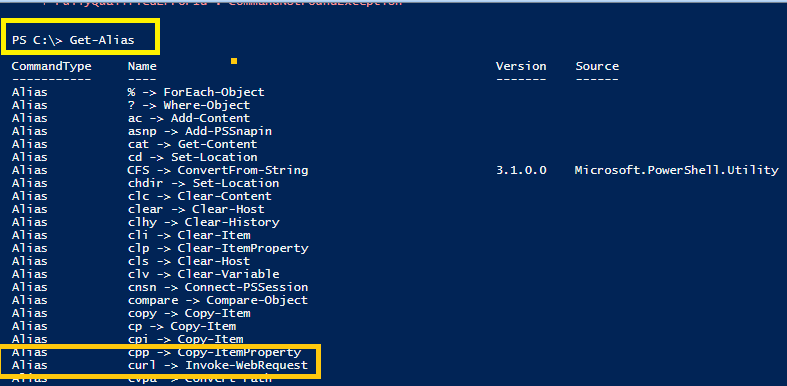
- References :
Solution :
- There is an option – to remove alias for curl
- We can use Remove-Alias cmdlet
- Syntax for Remove-Alias cmdlet
Remove-Alias
      [-Name] <String[]>
      [-Scope <String>]
      [-Force]
[<CommonParameters>]- Please note – Remove-Alias CMDLET is available PowerShell 6
- If you have older version then please use CMDLET – Remove-Item
- Syntax for Remove-Item
Remove-Item
      [-Path] <String[]>
      [-Filter <String>]
      [-Include <String[]>]
      [-Exclude <String[]>]
      [-Recurse]
      [-Force]
      [-Credential <PSCredential>]
      [-WhatIf]
      [-Confirm]
      [-Stream <String[]>]
      [<CommonParameters>]
Our other curl article – Microsoft 365 – resolving error : curl: (1) Protocol “‘https” not supported or disabled in libcurl – https://knowledge-junction.in/2021/12/04/microsoft-365-resolving-error-curl-1-protocol-https-not-supported-or-disabled-in-libcurl/
Thanks for reading 🙂 HAVE A GREAT TIME AHEAD 🙂


1 Response
[…] curl – resolving error – curl : The remote name could not be resolved: ‘–help’ – https://knowledge-junction.com/2021/12/07/curl-resolving-error-curl-the-remote-name-could-not-be-res… […]