Microsoft 365 new feature : Exchange online – Microsoft Defender 365 – Email summary panel for consistent navigation

Microsoft 365 - Microsoft 365 Defender - new email summary panel
Hi All,
Greetings for the day 🙂 LIFE IS BEAUTIFUL 🙂
Today one small update useful for Microsoft 365 / Exchange online admins / Security Teams
Update : Introducing the Email summary panel for consistent navigation within Microsoft Defender for Office 365 and Microsoft Defender 365
Details :
- Microsoft made it easier for security teams / admins to see the full picture of emails within Microsoft Defender for Office 365 and Microsoft Defender 365
- This feature helps our customers – easy navigation, consistency, saving time and effort
- This feature will replace the traditional Explorer flyout / other flyouts with email summary panel for experiences: Explorer, Advanced Hunting, Threat Protection Status report, Submissions, Quarantine.
- To view this new feature either navigate by direct URL – Microsoft 365 Defender
- OR
- From Microsoft 365 admin center
Steps to navigate Microsoft 365 Defender from Microsoft 365 admin center and visiting new Email summary panel
- Navigate to Microsoft 365 – https://www.office.com/?auth=2

- On click of “Admin” link from App Launcher we will be redirected to Microsoft 365 admin center

- From left blade click on “Security” link, we will redirected to Microsoft 365 Defender home page
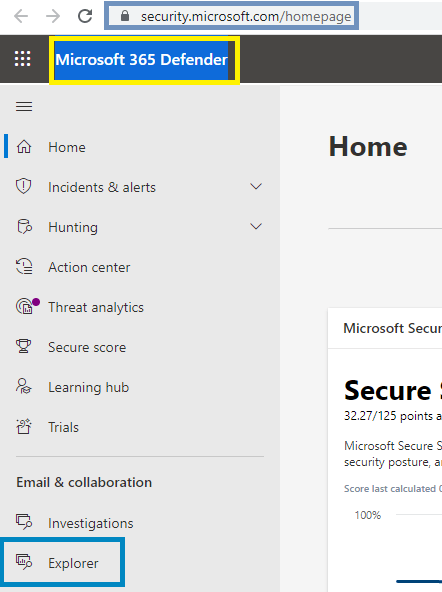
- Click on “Explorer” section to see all the Emails as – or we can go directly as well – https://security.microsoft.com/threatexplorer

- To view new email summary panel please click on any email as


- Microsoft has also introduced new entity page with single, integrated view of email
- We could navigate to entity page by clicking on link “Open email entity” as shown in above images. Link below the title of the email
- Email entity page as –


Associated Roadmap ID – 82101

Thanks for reading 🙂 HAVE A GREAT TIME AHEAD 🙂


You must be logged in to post a comment.