M365 – SharePoint Online – CSOM – Getting SharePoint client context using PnP.Framework in .NET Core application

PnP.Framework.AuthenticationManager class
Hi All,
LIFE IS BEAUTIFUL 🙂 I hope we all are safe 🙂 STAY SAFE, STAY HEALTHY, STAY HOME 🙂
Today, in this article we will discuss how to get SharePoint Online Client Context using new PnP Framework
Take away from this article :
- Understanding of limitation of SharePointOnlineCredentials class in .NET Core application
- Alternative approach of getting SharePoint Online client context using PnP.Framework
- Understanding PnP.Framework
Use Case : Following is the requirement –
- For our M365 tenant, customer wants to remove all extra added Site Collection administrators except two from all SharePoint sites
- We have couple of options here – PowerShell script / Console Application using CSOM
- Since we have some existing CSOM code available so thought to re-use it and save time 🙂
- So we went for the approach – having console application and executing CSOM code
Implementation:
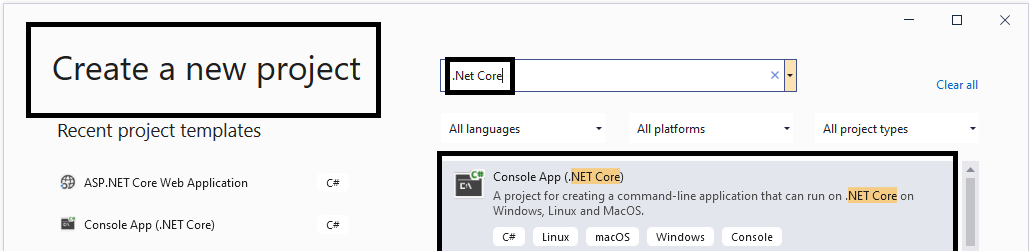
- This time we have went for .NET Core console application (Visual Studio 2019) as
- And then we have below sample code as usual to get the SharePoint Online site context, here we are using SharePoint admin credentials since this is one time activity. We have better options as well like using app id and secret…
SharePointOnlineCredentials spOnlineCreds = new SharePointOnlineCredentials(userName, password); //secured password string

var ctx = new ClientContext(url);
ctx.Credentials = credentials;- As soon as we build the project we have following error

Error CS0246 The type or namespace name ‘SharePointOnlineCredentials’ could not be found (are you missing a using directive or an assembly reference?)
Solution tried :
- We make sure that proper reference “SharePoint Client” libraries and namespaces are are added


- But is seems – not working. Then after bit research it seems this class – “SharePointOnlineCredentials” is removed from .NET Core CSOM libraries – https://docs.microsoft.com/en-us/answers/questions/58183/net-core-sharepointonlinecredentials-class.html
Alternative solution / New Approach :
- Again after bit research it found that we could use PnP.Framework
- What is PnPFramework :
- PnP Framework is a .NET Standard 2.0 / .NET 5.0 library targeting Microsoft 365 containing the PnP Provisioning engine and a ton of other useful extensions.
- This library is the cross platform successor of the PnP-Sites-Core library.
- The PnP-Sites-Core library is retired and archived.
- This library only supports SharePoint Online
Getting SharePoint Online context using PnP Framework :
- Make sure Nuget package for “PnP/Framework” is installed as

- Once we have PnP.Framework is in place, following is the sample code to get the SharePoint client context as
string siteUrl = "https://knowledgejunction1.sharepoint.com/";
string clientId = "";
string clientSecret = "";

//For SharePoint app only auth, the scope will be the SharePoint tenant name //followed by /.default
var scopes = new string[] {"https://knowledgejunction1.sharepoint.com/.default" };

using (var cc = new AuthenticationManager().GetACSAppOnlyContext(siteUrl,clientId, clientSecret))
 {
    cc.Load(cc.Web, p => p.Title);
    cc.ExecuteQuery();
    Console.WriteLine(cc.Web.Title);
};- AuthenticationManager class is available in PnP.Framework as

- AuthenticationManager().GetACSAppOnlyContext(siteUrl,clientId, clientSecret) => returns SharePoint online Client Context – Microsoft.SharePoint.Client.ClientContext as

Complete Code:
using PnP.Framework;
using System;

namespace M365ClientContextDemo
{
    class Program
    {
        static void Main(string[] args)
        {
            string siteUrl = "https://knowledgejunction1.sharepoint.com/";
            string clientId = "";
            string clientSecret = "";

            //For SharePoint app only auth, the scope will be the SharePoint tenant name followed by /.default
            var scopes = new string[] { "https://knowledgejunction1.sharepoint.com/.default" };

            using (var cc = new AuthenticationManager().GetACSAppOnlyContext(siteUrl,clientId, clientSecret))
            {
                cc.Load(cc.Web, p => p.Title);
                cc.ExecuteQuery();
                Console.WriteLine(cc.Web.Title);

            };
        }//main

    }//cs
}//nsReferences:
Thanks for reading 🙂 Feel free to discuss / comments / questions 🙂 SHARING IS CARING 🙂
Share In Teams:Enjoy the beautiful life 🙂 Have a FUN 🙂 HAVE A SAFE LIFE 🙂 TAKE CARE 🙂


You must be logged in to post a comment.