M365 : SharePoint Online – Option available to send SharePoint page to Yammer

Sharing SharePoint page to Yammer

Hi All,

LIFE IS BEAUTIFUL 🙂 I hope we all are safe 🙂 STAY SAFE, STAY HEALTHY, STAY HOME 🙂

Today very short post but important one so thought to share 🙂

  • We have now option available to share SharePoint page to the Yammer communities
  • This option is very useful to the organizations which uses Yammer very heavily and SharePoint online as Intranet
  • This option allows us to create Yammer posts as Discussions, Questions, Polls, and Praises directly from a SharePoint page.

Details :

  • Open the SharePoint page which we want to share to any Yammer community as
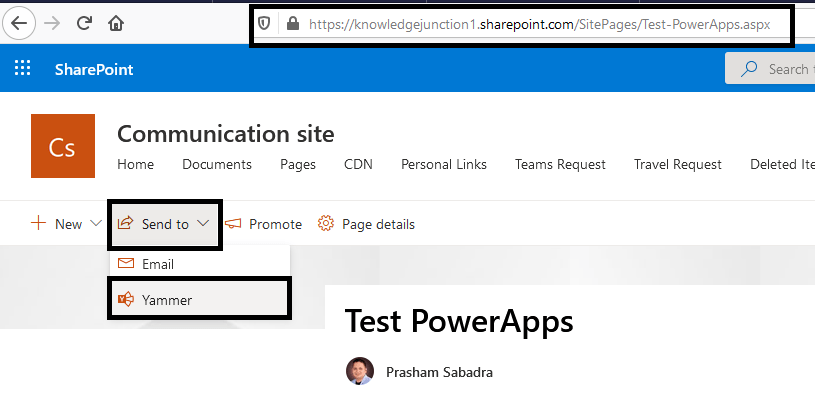
M365 - SharePoint Online - SharePoint Page - Sharing to Yammer option available
Fig: M365 – SharePoint Online – SharePoint Page – Sharing to Yammer option available
  • Once we clicked on “Yammer” option, “Send to Yammer” dialog will appear as shown in below Fig
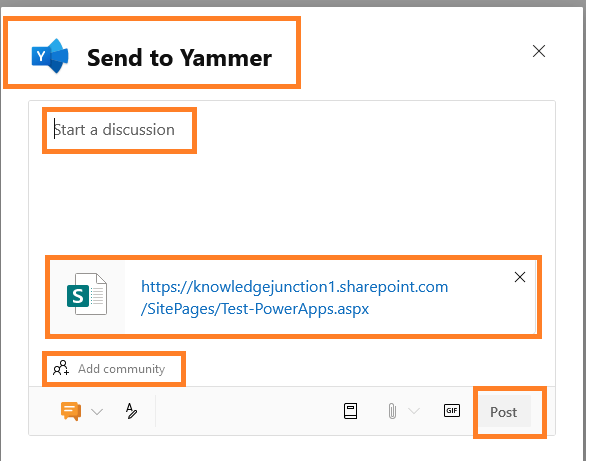
Fig: M365 – SharePoint Online – SharePoint Page – Sharing to Yammer – “Send to Yammer” dialog
  • There are various options/features available including
    • Default option for adding discussion. We can start the discussion
    • We have an option to adding community in those we need to share this page
    • We could attach files – Presentations / Documents / Estimates and so on
    • We could add GIFs
    • We could share this post as – Questions, Polls, and Praises
    • We could add topic to the page
  • Options to share SharePoint page as – Discussion / Question / Praise / Poll – as shown in below Fig
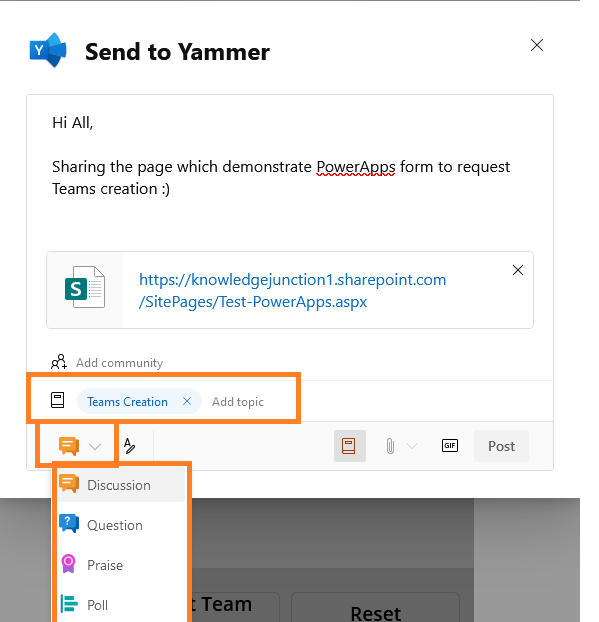
M365 - SharePoint Online - SharePoint Page - Sharing to Yammer - "Send to Yammer" dialog - Sharing page as Discussion (default option) / Question / Praise / Poll
Fig: M365 – SharePoint Online – SharePoint Page – Sharing to Yammer – “Send to Yammer” dialog – Sharing page as Discussion (default option) / Question / Praise / Poll
  • Option “+ Add community” to share page among Yammer communities as shown in below Fig
  • Here I am sharing my page to “All Company” community which is by default created
M365 - SharePoint Online - SharePoint Page - Sharing to Yammer - "Send to Yammer" dialog - Sharing page Yammer communities
Fig: M365 – SharePoint Online – SharePoint Page – Sharing to Yammer – “Send to Yammer” dialog – Sharing page Yammer communities
  • We have an option to attach/share relevant documents as shown in below Fig
M365 - SharePoint Online - SharePoint Page - Sharing to Yammer - "Send to Yammer" dialog - Attachment option
Fig: M365 – SharePoint Online – SharePoint Page – Sharing to Yammer – “Send to Yammer” dialog – Attachment option
  • Added the topic – “Teams Creation”.
  • Once we are done with all the details we are ready to post as shown in below fig
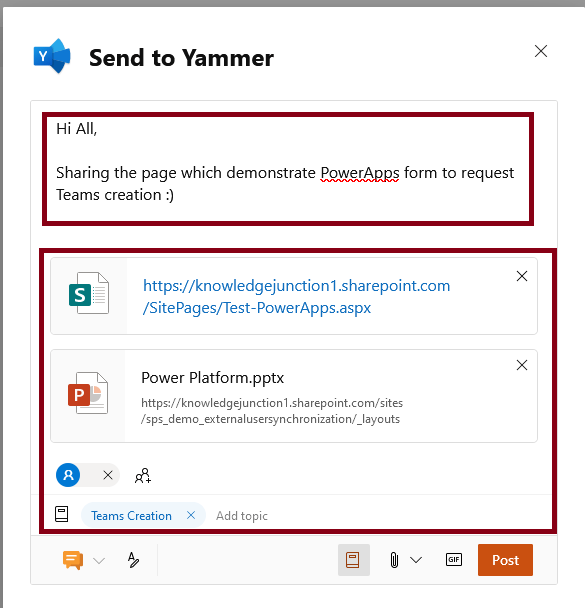
M365 - SharePoint Online - SharePoint Page - Sharing to Yammer - "Send to Yammer" dialog - started the discussion, Attached respective document, added Topic, sharing to "All Company" communities
Fig: M365 – SharePoint Online – SharePoint Page – Sharing to Yammer – “Send to Yammer” dialog – started the discussion, Attached respective document, added Topic, sharing to “All Company” communities
  • On successful post we will have following “Success” message as shown in below Fig
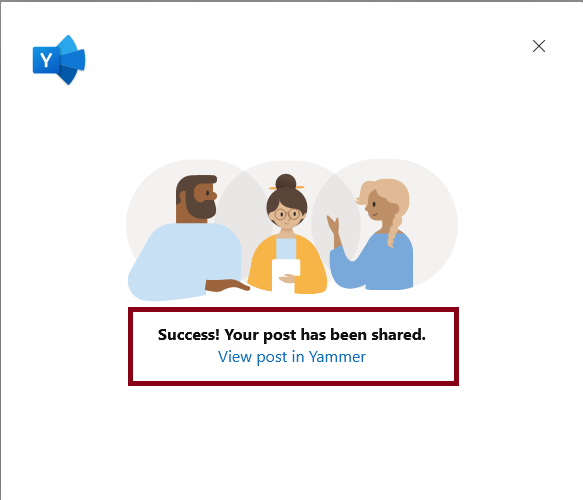
M365 - SharePoint Online - SharePoint Page - Posted to Yammer
Fig: M365 – SharePoint Online – SharePoint Page – Posted to Yammer
  • Next we could see the post in Yammer as – get posted in “All Company” group as shown in below Fig
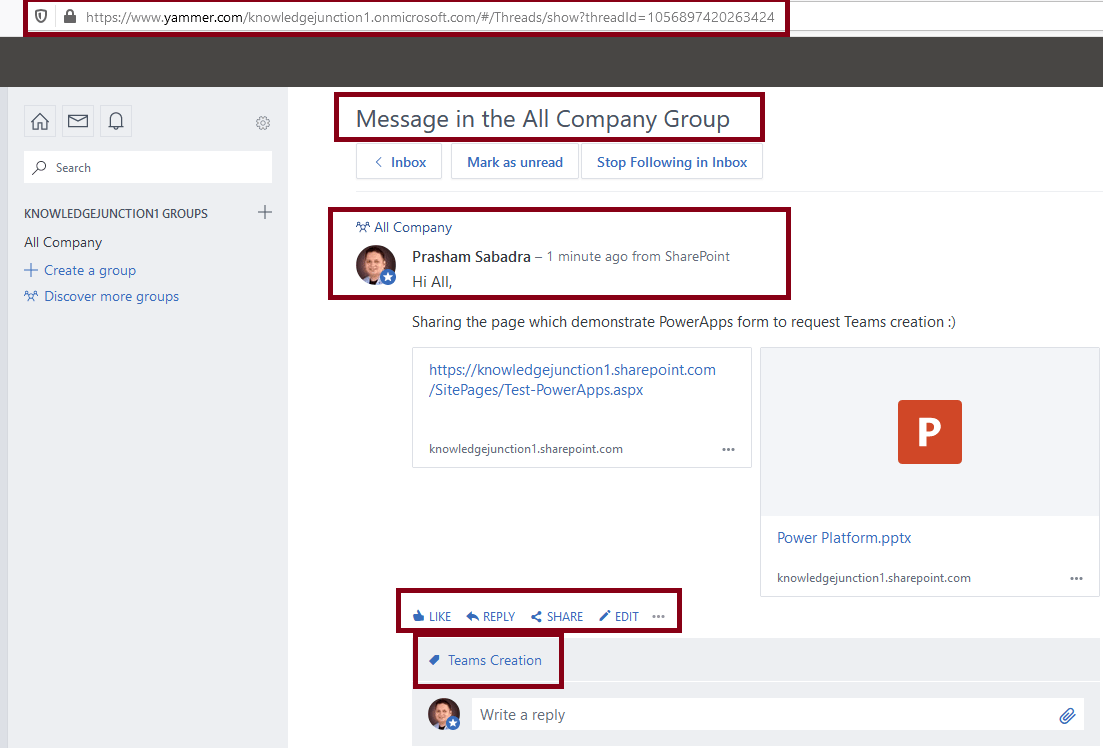
Fig: M365 - SharePoint Online - SharePoint Page - Posted to Yammer
Fig: M365 – SharePoint Online – SharePoint Page – Posted to Yammer

M365 roadmap associated with this change : Roadmap ID 66183 

Here, I’ll stop and will come up with new features 🙂

Thanks for reading 🙂 Feel free to discuss / comments / questions 🙂 SHARING IS CARING 🙂

Share In Teams:

Enjoy the beautiful life 🙂 Have a FUN 🙂 HAVE A SAFE LIFE 🙂 TAKE CARE 🙂

Prasham Sabadra

LIFE IS VERY BEAUTIFUL. ENJOY THE WHOLE JOURNEY :) Founder of Microsoft 365 Junction, Speaker, Author, Learner, Developer, Passionate Techie. Certified Professional Workshop Facilitator / Public Speaker. Believe in knowledge sharing. Around 20+ years of total IT experience and 17+ years of experience in SharePoint and Microsoft 365 services Please feel free me to contact for any SharePoint / Microsoft 365 queries. I am also very much interested in behavioral (life changing) sessions like motivational speeches, Success, Goal Setting, About Life, How to live Life etc. My book - Microsoft 365 Power Shell hand book for Administrators and Beginners and 100 Power Shell Interview Questions - https://www.amazon.in/Microsoft-Administrators-Beginners-Interview-Questions/dp/9394901639/ref=tmm_pap_swatch_0?_encoding=UTF8&qid=1679029081&sr=8-11

You may also like...

Leave a Reply

This site uses Akismet to reduce spam. Learn how your comment data is processed.

Discover more from Microsoft 365

Subscribe now to keep reading and get access to the full archive.

Continue reading