Azure – Preparing exam SC – 300 – Identity and Access Administrator – security defaults – Part 5

Hi All,
Greetings for the day 🙂 LIFE IS BEAUTIFUL 🙂
As I am preparing for the exam SC – 300, I am keep sharing the study material 🙂
if still didn’t got a chance to went through last three related articles please have a look once. I am trying to keep as simple as possible 🙂
- Preparing exam SC – 300 – Identity and Access Administrator – Associate Configure and manage Azure Active Directory roles – Study material – Part 1
- Preparing exam SC – 300 – Identity and Access Administrator – Associate Configure and manage custom Azure Active Directory roles – Study material – Part 2
- Preparing exam SC – 300 – Identity and Access Administrator – Configure and manage custom domains – Study material – Part 3
- Preparing exam SC – 300 – Identity and Access Administrator – Configure tenant-wide setting – Study material – Part 4
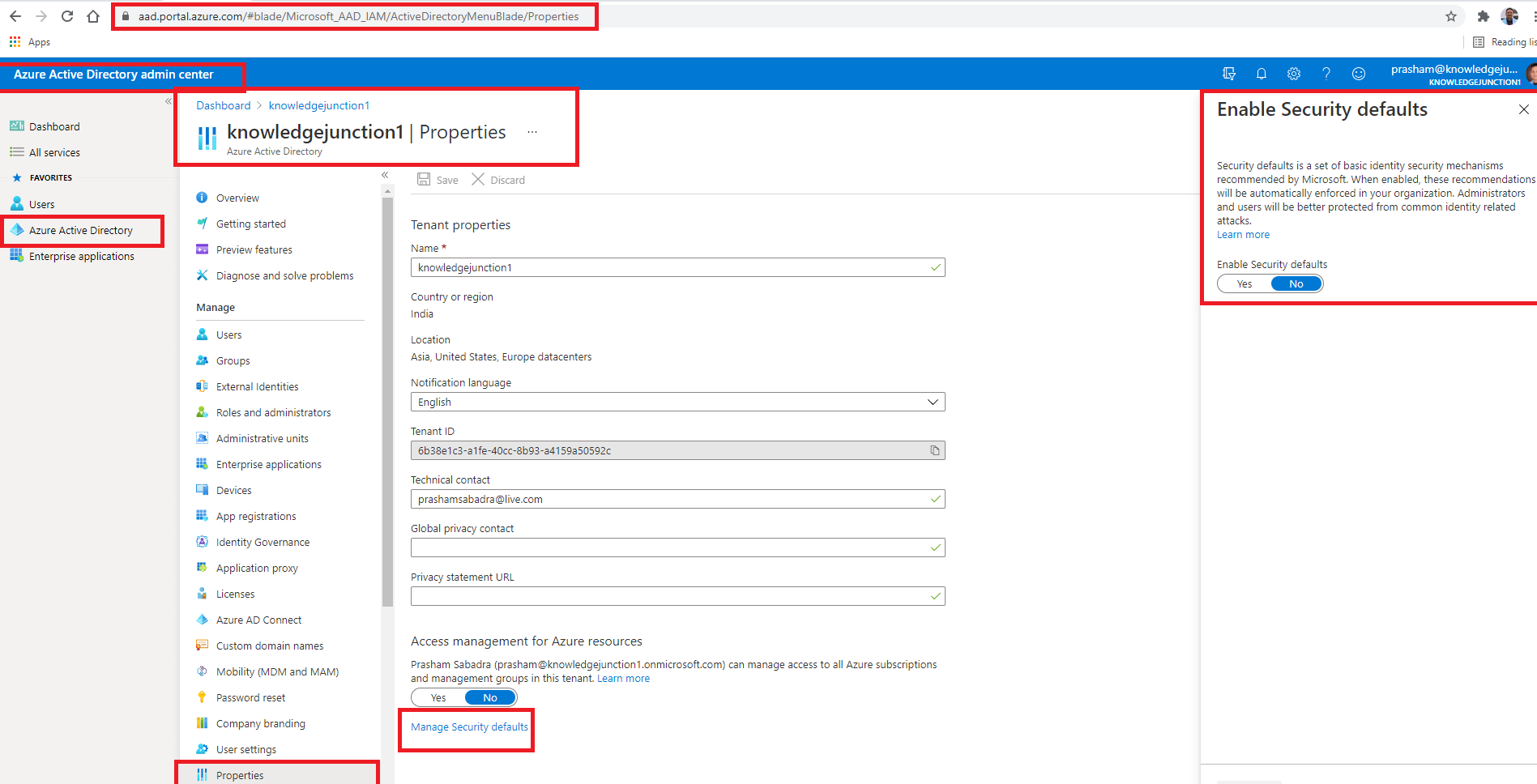
In last article we discussed bit about Security Defaults. We have a link “Manage Security defaults” on Azure AD properties blade/page as

If we click on “Manage Security defaults” link, right pane popups having the details about “Security defaults” as
What are Security Defaults :
- Security defaults is a set of basic identity security mechanisms recommended by Microsoft
- Microsoft introduced Security Defaults in new M365 tenants on October 2019
- When enabled, these recommendations will be automatically enforced in our organization.
- Administrators and users will be better protected from common identity related attacks.
- Security defaults helps to protect our organization from the attacks like password spray, replay, and phishing with few preconfigured settings :
- Requiring all users to register for Azure AD Multi-Factor Authentication.
- All users in the tenant must register the MFA
- Users have 14 days to register for Azure AD Multi-factor authentication by using Microsoft Authenticator App
- This 14 days period begins with after first successful sign-in after enabling Security Defaults
- If 14 days get passed, the user wont be able sign in until registration is complete
- Requiring administrators to perform multi-factor authentication
- Following Azure AD roles will be required to perform MFA each time they login
- Global administrator
- SharePoint administrator
- Exchange administrator
- Conditional Access administrator
- Security administrator
- Helpdesk administrator
- Billing administrator
- User administrator
- Authentication administrator
- Following Azure AD roles will be required to perform MFA each time they login
- Blocking legacy authentication protocols – I’ll write separate article on legacy authentication protocols
- Requiring users to perform multi-factor authentication when necessary.
- Protecting privileged activities like access to the Azure portal.
- Requiring all users to register for Azure AD Multi-Factor Authentication.
- Security defaults are offered free to all office 365 subscriptions.
- Once Security Defaults are enabled at tenant lever, it get applied to all the users in tenant. There is no way to exclude or include some users.
- If we enable conditional policy then we wont be able to subscribe Security Defaults
When should we use Security Defaults:
- When we want these preconfigured security settings in place. Simple one click switch either on or off
- We need MFA for all the users in our tenant without any exception or special case
I’ll stop here for this article 🙂
Thanks for reading 🙂 If its worth at least reading once, kindly please like and share 🙂 SHARING IS CARING 🙂
Share In Teams:Enjoy the beautiful life 🙂 Have a FUN 🙂 HAVE A SAFE LIFE 🙂 TAKE CARE 🙂


2 Responses
[…] Azure – Preparing exam SC – 300 – Identity and Access Administrator – security defaults – Part 5 https://knowledge-junction.com/2021/03/19/preparing-exam-sc-300-identity-and-access-administrator-se… […]
[…] We have detailed article on “Security Default“. Azure – Preparing exam SC – 300 – Identity and Access Administrator – security defaults – Part 5 – https://microsoft365junction.com/2021/03/19/preparing-exam-sc-300-identity-and-access-administrator-… […]