Microsoft Teams – Channel moderation

Microsoft Teams - Channel moderation is ON - permission setting for Team members
Hi All,
Greetings for the day 🙂 LIFE IS BEAUTIFUL 🙂
Today I got to know something new related to Microsoft Teams channel and seems to be nice feature so sharing 🙂
Microsoft Teams channels feature – Channel moderation
What is Microsoft Teams Channel Moderation ?
- Moderation for Teams channel is setting which allows to set
- Who can start a new post
- Allows to set team member permissions for
- Whether to allow team members to reply message
- Whether to allow team members to pin channel
- Whether to allow bots to post team message
- Whether to allow connectors to post team message
How to manage Team Channel Moderation ?
- Navigating to Channel settings as

- Please note that on channel settings page – by default Channel moderation is off

- To turn on the Channel moderation setting – change the value – On in Channel moderation dropdown
- Once we turned On – Channel moderation, we will have the settings which we can set

How can add Team Channel Moderators ?
- Once we have turned ON Channel moderation we can manage the channel moderators
- Team owners are default moderators for channel
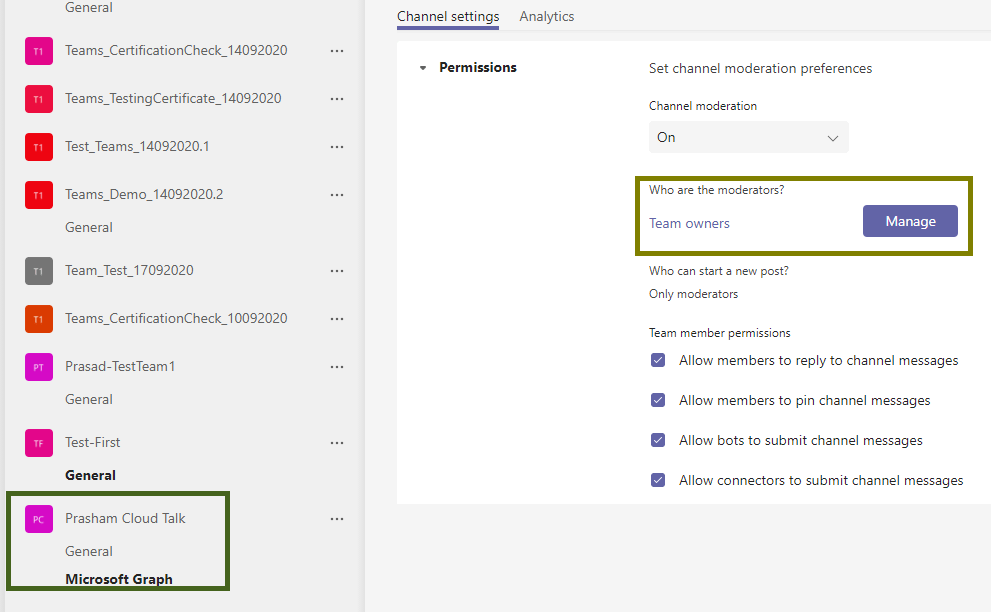
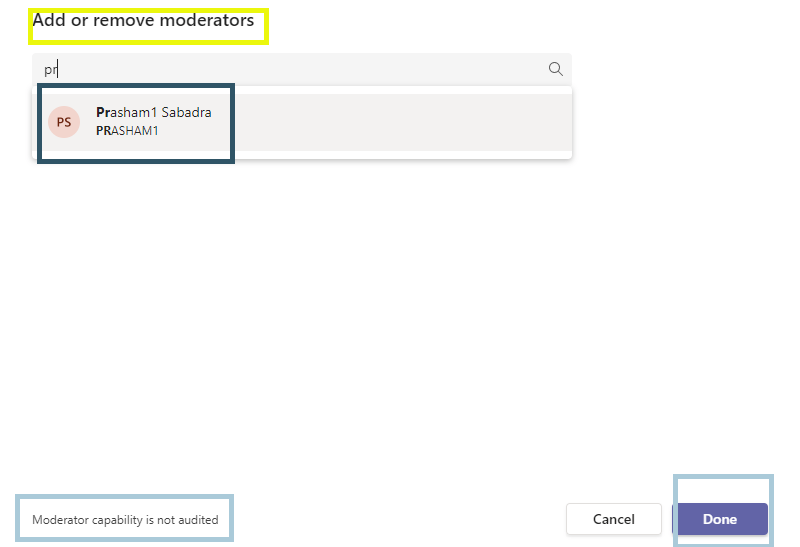
- Click on “Manage” button in above fig, we will have “Add or remove moderators” dialog from which we can add the Channel moderators as shown in below fig
Scenarios for using moderators for Team channels :
- Consider scenario of Announcement channel – where manager will do only important posts related to project announcements of deliverables
Few important points regarding Team Channel Moderation :
- By default Channel moderation is OFF
- Channel moderation is available only for standard channels and not for General and Private channels

- Channel moderation is per channel setting
- There is no tenant level setting for channel moderation
Knowledge Junction have very good team articles and latest updates about Microsoft Teams. Kindly please have a look once – https://knowledge-junction.in/category/technology-articles/m365/microsoft-teams/
Thanks for reading 🙂
STAY SAFE 🙂 STAY HEALTHY 🙂


You must be logged in to post a comment.