SharePoint On-Premises : PowerShell script to find out app instances from all webs of all Site Collection in a Web Application

SharePoint On-Premises - PowerShell script to enlist all webs where given app is instantiated
Hi All,
Greetings for the day 🙂 LIFE IS BEAUTIFUL 🙂
SharePoint migration continues. Today sharing one more small PowerShell script required in SharePoint migration
Background :
- We are in process of migration of our SharePoint 2013 application to SharePoint online (Microsoft 365)
- One of the step / process in this migration is to analyze the customizations
- We have one custom app is installed in app catalog of SharePoint 2013 on-premises environment
- Since this app is very old we need to confirm with the owners of the site where this app is instantiated/ used
- Because of above requirement this PowerShell script born 🙂 – Enlist all the web where given app is installed 🙂
Step by step PowerShell script :
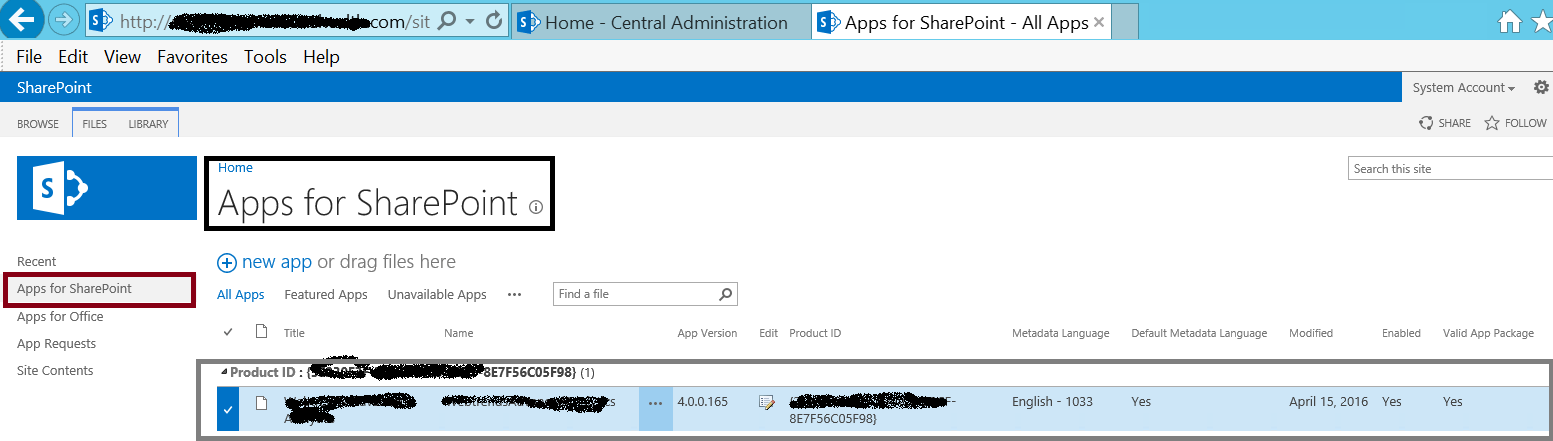
- Add the snap in for SharePoint PowerShell
#Add snap in for SharePoint PowerShell
Add-PsSnapin Microsoft.SharePoint.PowerShell- Get the app title of the app
- We will get all app details including app Title, app Name, app Id, app Owner from the App Catalog site collection as shown in above fig
#app title which we need to find
$appTitle = "My app title"- We will loop through each site collection in our Web Application
- Then we will loop each web for each site collection
- We will use Get-SPAppInstance PowerShell CMDLET to get the app instance
- Syntax – Get-SPAppInstance
Get-SPAppInstance
   -Identity <SPAppInstance>
   [-AssignmentCollection <SPAssignmentCollection>]
   [<CommonParameters>]

Get-SPAppInstance
   [-App <SPApp>]
   [-AssignmentCollection <SPAssignmentCollection>]
   -Web <SPWebPipeBind>
   [<CommonParameters>]
Examples :
- Get collection of all apps installed on given web
Get-SPAppInstance -Web https://knowledgejunction.sharepoint.com#fetch the app instance if it matches with our app
$appInstance = Get-SPAppInstance -Web $web.Url | Where{$_.Title -eq $appTitle}Complete Script :
#PowerShell to find the app instances - lists all the web URLs where given app is installed in my web application
#Add snap in for SharePoint PowerShell
Add-PsSnapin Microsoft.SharePoint.PowerShell
#app title which we need to find
$appTitle = "My app title"
#my web application url
$rootUrl = "https://knoweldgejunction.sharepoint.com/"
#get the web application
$webApp = Get-SPWebApplication $rootUrl
#loop through all site collection in web application
foreach($site in $webApp.Sites){
#loop through all the webs from respective site collection
foreach($web in $site.AllWebs){
#fetch the app instance if it matches with our app
$appInstance = Get-SPAppInstance -Web $web.Url  | Where{$_.Title -eq $appTitle}
if($appInstance -ne $null){
#writting the respective URL in console - we can get this list in either CSV or TEXT file
Write-Host $web.Url -BackgroundColor Green
Write-Host $appInstance.App.VersionString -BackgroundColor Cyan
}#if($appInstance -ne $null){
}#foreach($web in $site.AllWebs){
}#foreach($site in $webApp.Sites){

Thanks 🙂 STAY SAFE 🙂 STAY HEALTHY 🙂


You must be logged in to post a comment.