Microsoft 365 – SharePoint Online : new feature : Manage Teams and channel connected team sites in SharePoint admin center

Microsoft 365 - Teams - Channel sites are now accessible through SharePoint admin center UX as well

Hi All,

Greetings for the day 🙂 LIFE IS BEAUTIFUL 🙂

Today, new feature related to SharePoint online and Microsoft Teams. These features are important for SharePoint online administrators and Teams administrators

Feature : Manage Teams and channel connected team sites in SharePoint admin center

Details :

  • Previously channel sites were only accessible through PowerShell and through Teams client app
  • Now channel sites will also be accessible through SharePoint admin center UX as well
  • Now In SharePoint admin center, channel sites are accessible, channel sites are created when special channel (Private channel) are created in Teams. I’ll write separate article for private channels 🙂
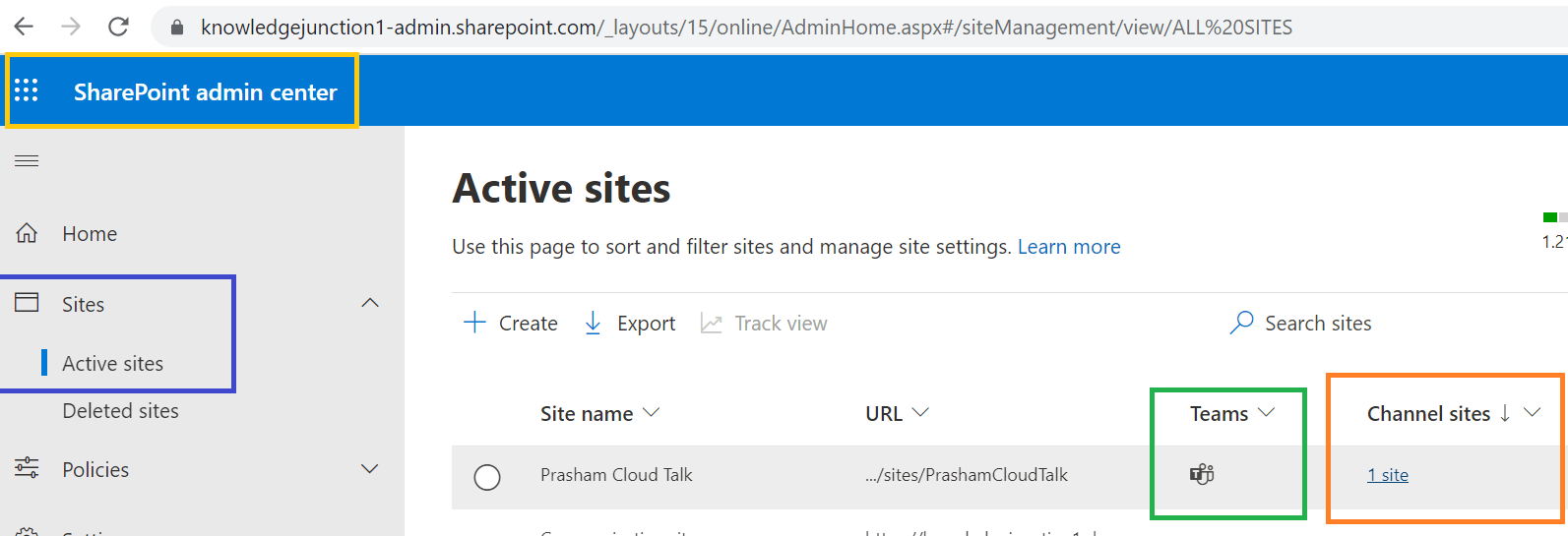
SharePoint Online - Active sites - Channel sites listing is included
Fig : SharePoint Online – Active sites – Channel sites listing is included
Fig : SharePoint Online - Active sites - Channel sites listing is included
Fig : SharePoint Online – Active sites – Channel sites listing is included
  • To view channel sites we can click on link specified (“1 site” – as in above window) under “Channel sites” column as shown in above fig
  • On click of link we will redirected to “channelsites” page showing the type of channel – column “Type” as
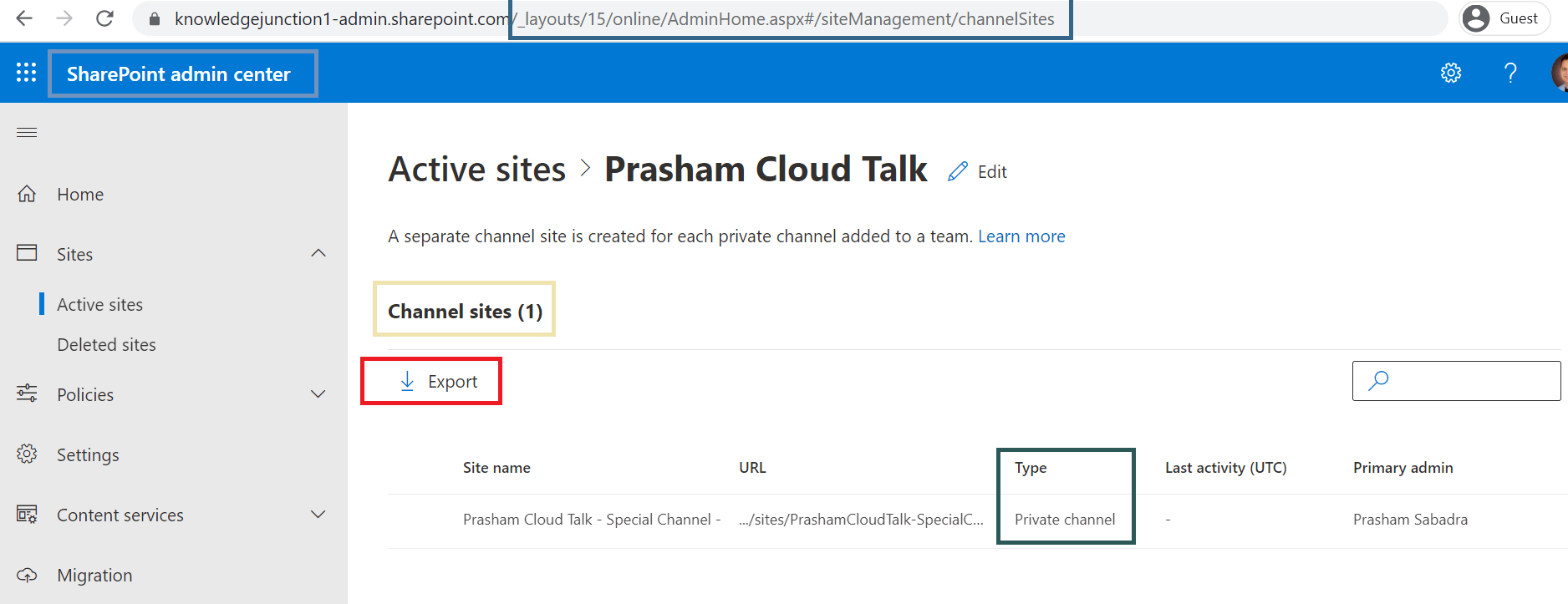
SharePoint Online - Active sites - Channel page - listing of all channel from the given team along with channel type
Fig : SharePoint Online – Active sites – Channel page – listing of all channel from the given team along with channel type
  • Info panel for channel sites now shows more details as
SharePoint Online - Active sites - Channel page - channel info page
Fig : SharePoint Online – Active sites – Channel page – channel info page
  • New Team filters to show only Teams connected sites or not connected teams sites – “Connected to Microsoft Teams” or “Not connected to Microsoft Teams
SharePoint Online - Active sites -  Teams filter - "Connected to Microsoft Teams" and "Not connected to Microsoft Teams"
Fig : SharePoint Online – Active sites – Teams filter – “Connected to Microsoft Teams” and “Not connected to Microsoft Teams”

Roll-Out timings : Microsoft has started rolling out this feature in beginning of December 21 and will complete the roll-out by late January

Thanks for reading 🙂 HAVE A FANTASTIC DAY AHEAD 🙂

Prasham Sabadra

LIFE IS VERY BEAUTIFUL. ENJOY THE WHOLE JOURNEY :) Founder of Microsoft 365 Junction, Speaker, Author, Learner, Developer, Passionate Techie. Certified Professional Workshop Facilitator / Public Speaker. Believe in knowledge sharing. Around 20+ years of total IT experience and 17+ years of experience in SharePoint and Microsoft 365 services Please feel free me to contact for any SharePoint / Microsoft 365 queries. I am also very much interested in behavioral (life changing) sessions like motivational speeches, Success, Goal Setting, About Life, How to live Life etc. My book - Microsoft 365 Power Shell hand book for Administrators and Beginners and 100 Power Shell Interview Questions - https://www.amazon.in/Microsoft-Administrators-Beginners-Interview-Questions/dp/9394901639/ref=tmm_pap_swatch_0?_encoding=UTF8&qid=1679029081&sr=8-11

You may also like...

Leave a Reply

This site uses Akismet to reduce spam. Learn how your comment data is processed.

Discover more from Microsoft 365

Subscribe now to keep reading and get access to the full archive.

Continue reading