Power Platform – Power Automate – Run a flow on Edit Item – Getting recent updates of SharePoint list item

fig : Power Automate - Demonstrating trigger "When an item or a file is modified" and action "Get changes for an item or a file (properties only)"
Power Automate - Demonstrating trigger "When an item or a file is modified" and action "Get changes for an item or a file (properties only)"

Hi All,

Greetings for the day!!!

I learned something new in Power Automate and so this article.

Background / Use Case

  • We have SharePoint list having column “status” with possible values
    • New
    • In Progress
    • Completed
  • On every status change we need to send an email to respective teams
  • For status – New its very easy, on item creation we can send an email
  • For update on status column we need to send an email so looking for solution

Solution – SharePoint trigger – “When an item or a file is modified”

  • In Power Automate we have a trigger in “SharePoint” call “When an item or a file is modified
  • This trigger made lot easier to get the changes / updates when item or file is updated
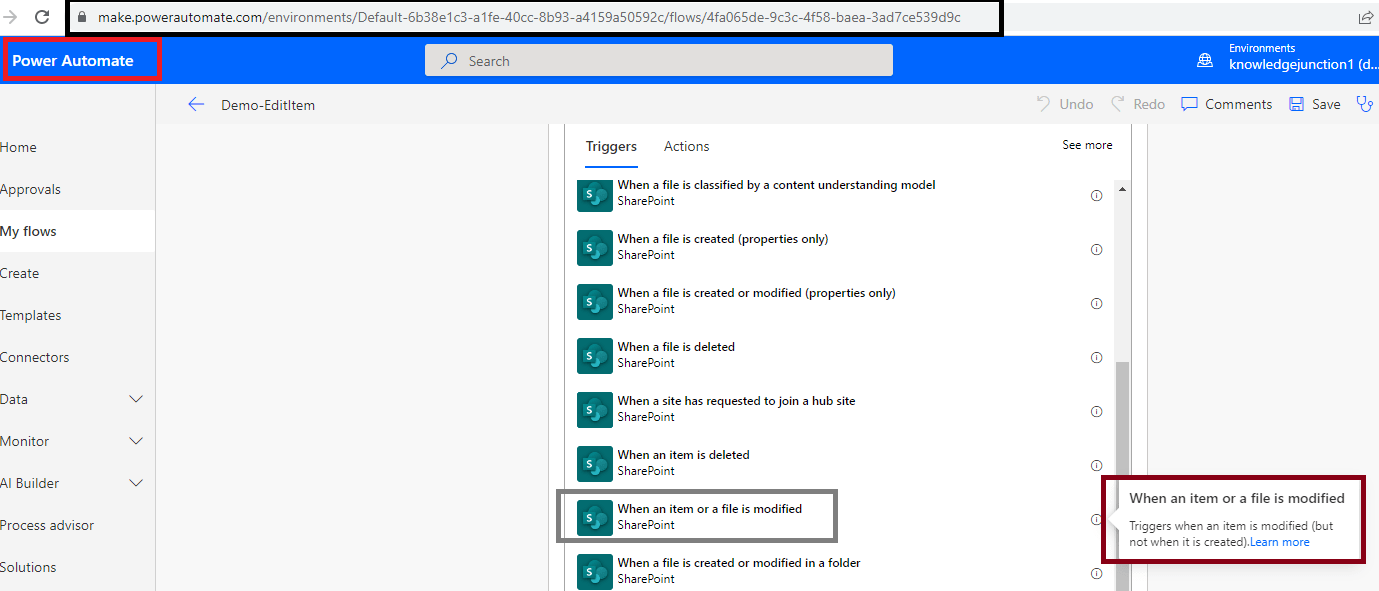
fig : Power Automate - trigger - "When an item or a file is modified"
fig : Power Automate – trigger – “When an item or a file is modified”
  • We need to specify details
    • Site Address
    • List or Library Name
fig : Power Automate - details for an trigger "When an item or a file is modified"
fig : Power Automate – details for an trigger “When an item or a file is modified
  • Now, next thing is how to get updates
  • We have an SharePoint action “Get changes for an item or a file (properties only)
    • This action returns information about columns that have changed within a given time window
fig : Power Automate - action - "Get changes for an item or a file (properties only)"
fig : Power Automate – action – “Get changes for an item or a file (properties only)”

Note : This action requires versioning is enabled for list or library

  • Add the action “Get changes for an item or a file (properties only)
  • This action requires following details
    • Site Address
    • List or Library Name
    • Id – Id of the item for which we need to get the changes
    • Since – Possible values are
      • Trigger Window Start Token OR
      • an item version label OR
      • ISO 8601 date , for ex – YYYY-MM-DDhh:mmz
    • Until – Possible values are
      • Trigger Window End Token OR
      • an item version label OR
      • ISO 8601 date , for ex – YYYY-MM-DDhh:mmz
  • Trigger Window Start Token and Trigger Window End Token returns the changes since last update
fig : Power Automate - details for an action "Get changes for an item or a file (properties only)"
fig : Power Automate – details for an action “Get changes for an item or a file (properties only)
  • Based on “Since” and “Until” values, updates are returned
fig : Power Automate - details for an action "Get changes for an item or a file (properties only)"
fig : Power Automate – details for an action “Get changes for an item or a file (properties only)
  • The action outputs tokens such as Has Colum Changed:<Column name>” for every column
  • These tokens can be used to filter the column which we want to use in our flow
  • As shown in below fig, we are checking if item title is changed – “Has Column Changed: Title
fig : Power Automate - action "" outputs token - "Has Colum Changed:<Column name>"
fig : Power Automate – action “” outputs token – Has Colum Changed:<Column name>

Complete Demo

fig : Power Automate - Demonstrating trigger "When an item or a file is modified" and action "Get changes for an item or a file (properties only)"
fig : Power Automate – Demonstrating trigger “When an item or a file is modified” and action “Get changes for an item or a file (properties only)

Thanks for reading. If its worth at least reading once, kindly please like and share !!! SHARING IS CARING 🙂

Enjoy the beautiful life !!! Have a FUN !!! HAVE A SAFE LIFE !!! TAKE CARE 🙂

Prasham Sabadra

LIFE IS VERY BEAUTIFUL. ENJOY THE WHOLE JOURNEY :) Founder of Microsoft 365 Junction, Speaker, Author, Learner, Developer, Passionate Techie. Certified Professional Workshop Facilitator / Public Speaker. Believe in knowledge sharing. Around 20+ years of total IT experience and 17+ years of experience in SharePoint and Microsoft 365 services Please feel free me to contact for any SharePoint / Microsoft 365 queries. I am also very much interested in behavioral (life changing) sessions like motivational speeches, Success, Goal Setting, About Life, How to live Life etc. My book - Microsoft 365 Power Shell hand book for Administrators and Beginners and 100 Power Shell Interview Questions - https://www.amazon.in/Microsoft-Administrators-Beginners-Interview-Questions/dp/9394901639/ref=tmm_pap_swatch_0?_encoding=UTF8&qid=1679029081&sr=8-11

You may also like...

Leave a Reply

This site uses Akismet to reduce spam. Learn how your comment data is processed.

Discover more from Microsoft 365

Subscribe now to keep reading and get access to the full archive.

Continue reading