Microsoft 365 : Exchange Online / PowerShell – Resolving error – Send-MailMessage : The SMTP server requires a secure connection or the client was not authenticated. The server response was: 5.7.57 Client not authenticated to send mail

Exchange admin center - Mail flow settings
Hi All,
Today new issue and solution 🙂
Details / Background
- We have to send an email from one of our PowerShell script
- To send an email we are using Send-MailMessage CMDLET as
PS C:\> Send-MailMessage -from $EmailFrom -To $EmailTo -Subject "Subject - LIFE IS BEAUTIFUL" -Body "LIFE IS BEAUTIFUL" -BodyAsHtml -smtpserver "smtp.office365.com" -usessl -Credential $cred -Port 587- While executing this “Send-MailMessage” CMDLET we were getting an issue
ISSUE / ERROR
Send-MailMessage : The SMTP server requires a secure connection or the client was not authenticated. The server response was: 5.7.57 Client not authenticated to send mail. Error: 535 5.7.139
Authentication unsuccessful, SmtpClientAuthentication is disabled for the Tenant. Visit https://aka.ms/smtp_auth_disabled for more information. [MA1P287CA0021.INDP287.PROD.OUTLOOK.COM
2023-02-06T14:33:38.610Z 08DB083CF80AB0C7]
At line:1 char:1
- Send-MailMessage -from $EmailFrom -To $EmailTo -Subject “Subject – LI …
~~~~~~~~~~~~~~~~~- CategoryInfo : InvalidOperation: (System.Net.Mail.SmtpClient:SmtpClient) [Send-MailMessage], SmtpException
- FullyQualifiedErrorId : SmtpException,Microsoft.PowerShell.Commands.SendMailMessage

Solution
- There is a setting which we need to update from Exchange admin center
- Setting – “Turn off SMTP AUTH protocol for your organization” – this setting is “ON” by default. This means – Microsoft 365 mailboxes have SMTP client authentication disabled by default.
- So we need to enable it.
Steps to enable Microsoft 365 mailboxes SMTP client authentication
- Navigate to Exchange online admin center – either through Microsoft 365 admin center or from direct URL – https://admin.exchange.microsoft.com/
- We have detailed article – How to navigate to Exchange Online admin center – Small Tips and Tricks – Exchange admin center – How to navigate to Exchange admin center
- Once we are in Exchange admin center as
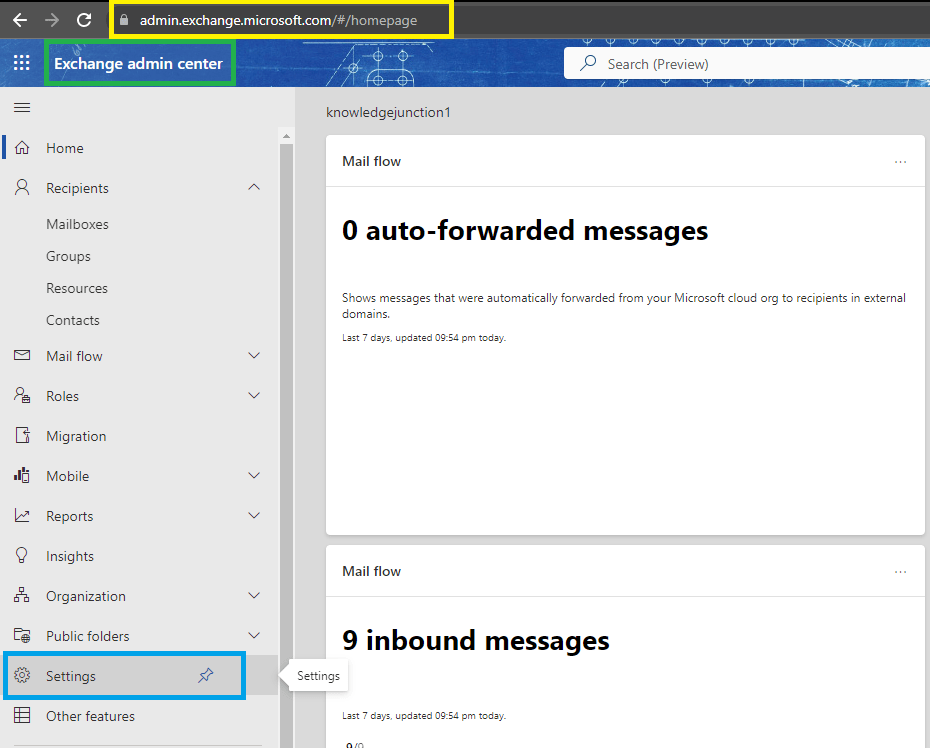
- From left blade click on “Settings” link, we will be redirected to Exchange admin center Settings page as
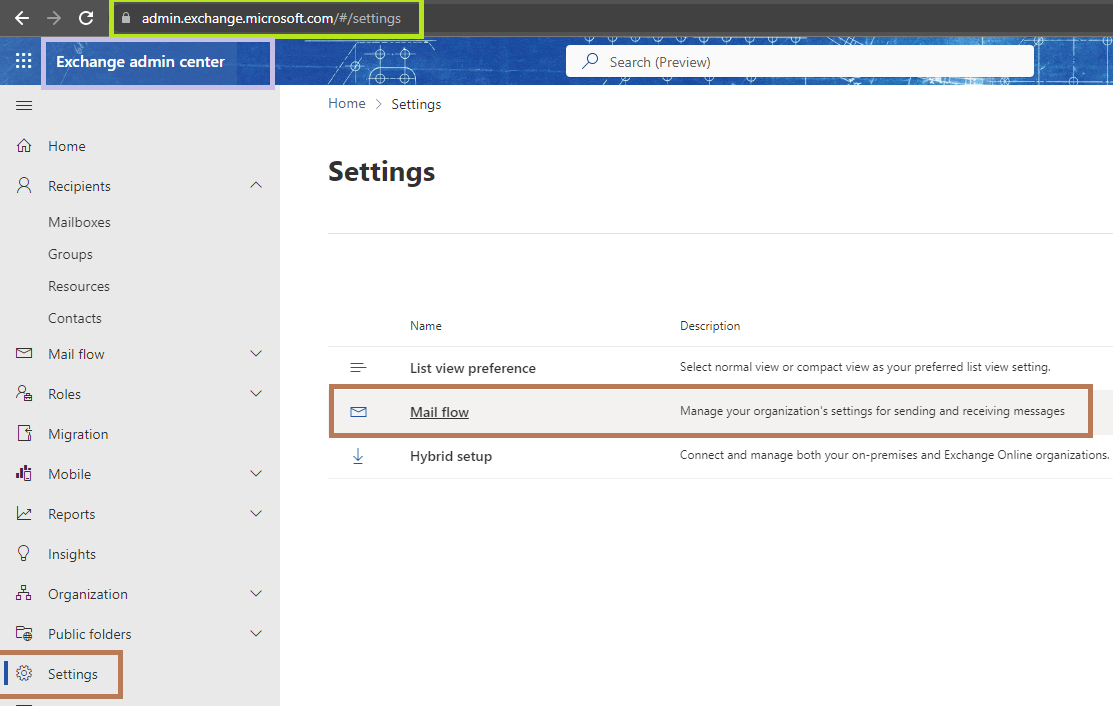
- From Settings blade click on setting – “Mail flow”
- Right pane will appear – “Mail flow settings” will open as
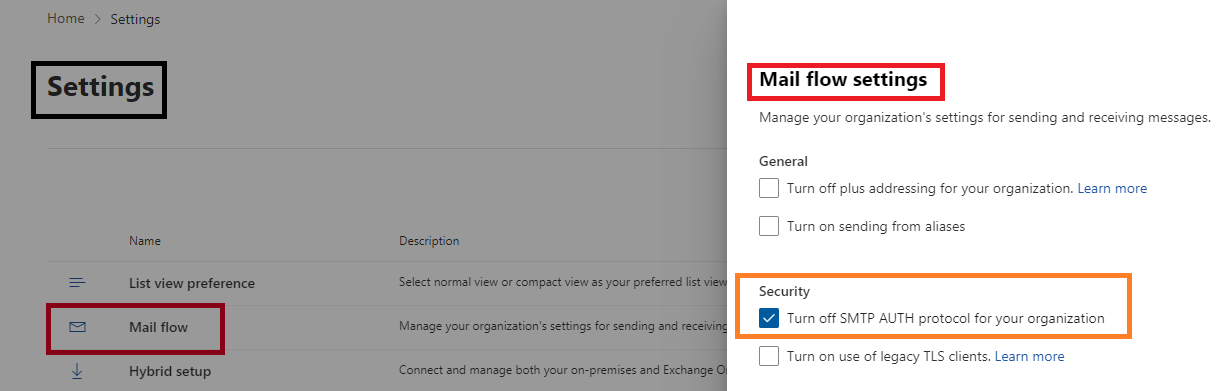
- As in above figure – “Mail flow settings” – Under “Security” section uncheck the check box for setting – “Turn off SMTP AUTH protocol for your organization” – Save the respective changes
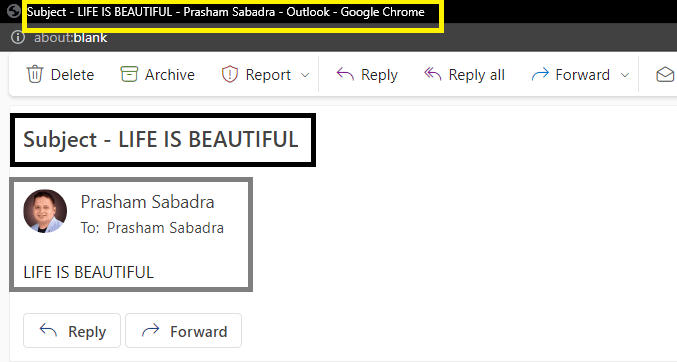
- Once we update the above setting we will be successfully able to send the email as
Thanks for reading !!!
HAVE A FANTASTIC TIME AHEAD !!! LIFE IS BEAUTIFUL 🙂


2 Responses
[…] Microsoft 365 : Exchange Online / PowerShell – PowerShell – Resolving error – Send-MailMessage : The SMTP server requires a secure connection or the client was not authenticated. The server response was: 5.7.57 Client not authenticated to send mail – https://knowledge-junction.in/2023/02/07/microsoft-365-exchange-online-powershell-resolving-error-se… […]
[…] Microsoft 365 : Exchange Online / PowerShell – PowerShell – Resolving error – Send-MailMessage : The SMTP server requires a secure connection or the client was not authenticated. The server response was: 5.7.57 Client not authenticated to send mail – https://knowledge-junction.in/2023/02/07/microsoft-365-exchange-online-powershell-resolving-error-se… […]