PowerShell – PnP – Add-PnPFile fails with “Access denied” resolving the error

fig : PowerShell - Executing CMDLET "Add-PnPFile" - "Access denied" error
Hi All,
Greetings for the day!!! Today new issue and resolution 🙂
Issue – Getting “Access denied” error while executing Add-PnPFile PowerShell CMDLET
Details / Background
- In our one of the SharePoint online project, we are executing PowerShell script
- One of the requirement is to upload few files in “Site Assets” library
- We were implementing this requirement using PowerShell and using “Add-PnPFile” CMDLET
- While executing “Add-PnPFile” CMDLET we are getting “Access denied” error
Issue / Error
PS C:\> Add-PnPFile -Path “C://Users//Documents//PS//ApplyTemplate//images//hideRepublishButton.html” -Folder “SiteAssets”
Add-PnPFile : Access denied.
- Add-PnPFile -Path “C://Users//Documents//PS//ApplyTe …
~~~~~~~~~~~~~~~~~- CategoryInfo : InvalidOperation: (:) [Add-PnPFile], PSInvalidOperationException
- FullyQualifiedErrorId : InvalidOperation,PnP.PowerShell.Commands.Files.AddFile

Reason / Cause
- I am the Site Collection Administrator on the respective site though the error occurred
- I am SharePoint administrator in Tenant
- I am part of Owners group
- Still to navigate permissions I went to permission page
- /_layouts/15/user.aspx OR
- Gear icon >> settings >> Site permissions >> Advanced permissions settings
- We have detailed article to verify User / Group permissions from UI, please have a look – Microsoft 365 – SharePoint online – How to verify any User / Group permissions on given site from UI

- To check my permissions I clicked on “PERMISSIONS” tab as

- Click on “Check Permissions” ribbon button as shown in above fig
- On click of “Check Permissions” ribbon button we will have “Check Permissions” dialog as

- In above figure if we notice “Check Permissions” dialog – check the last line – “Deny” for :Add and Customize Pages” and this is the issue.
Solution
- To make it work we can update site collection level property – DenyAddAndCustomizePages
- By default value for DenyAddAndCustomizePages property is Enables, we need to disable it
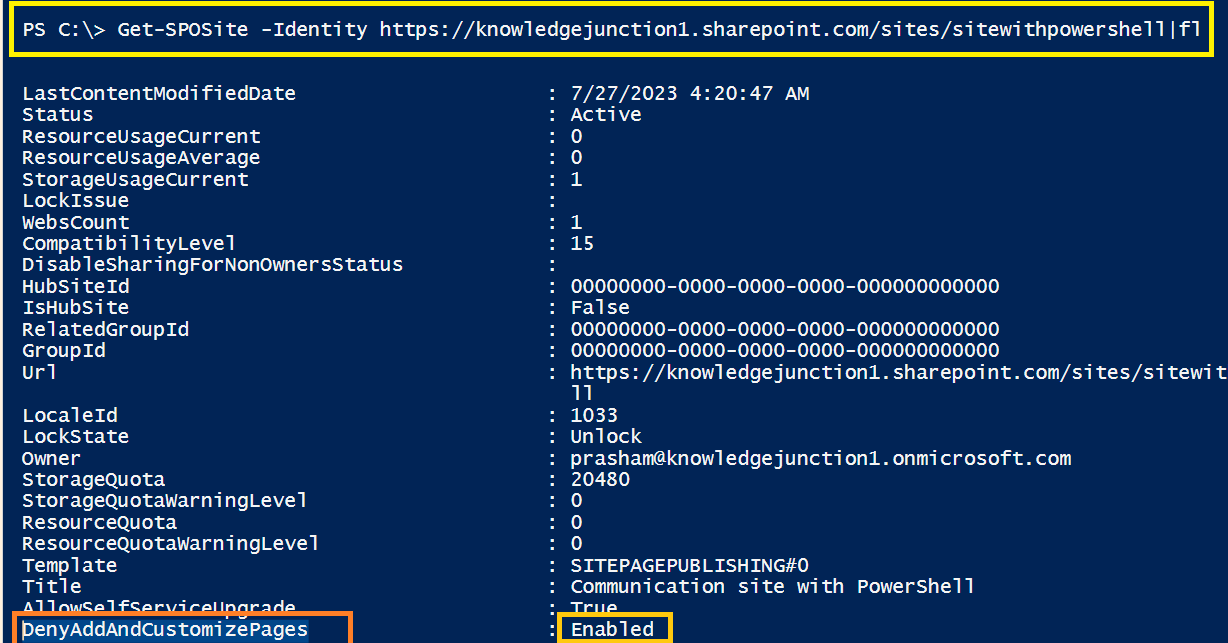
- Updating Site Collection property – using PowerShell we will use “Set-SPOSite” PowerShell CMDLET as
# Updating site collection level property - "DenyAddAndCustomizePages" using "Set-SPOSite" CMDLET
Set-SPOSite -DenyAddAndCustomizePages $false -Identity https://knowledgejunction1.sharepoint.com/sites/sitewithpowershell

#once updated successfully, verifying the respective property
Get-SPOSite -Identity https://knowledgejunction1.sharepoint.com/sites/sitewithpowershell |fl -Property DenyAddAndCustomizePages
DenyAddAndCustomizePages : Disabled
- After successfully updating property, we will able to upload the respective files
PS C:\>  Add-PnPFile -Path "C://Users//Documents//PS//ApplyTemplate//images//hideRepublishButton.html" -Folder "SiteAssets"

Name                     Type Items/Size Last Modified
----                     ---- ---------- -------------
hideRepublishButton.html File        283 7/30/2023 8:14:03 AM
REFERENCES
Allow or prevent custom script
Thanks for reading ! HAVE a FANTASTIC LEARNING AHEAD !! LIFE IS BEAUTIFUL 🙂


You must be logged in to post a comment.