PowerShell tutorial – exploring Error handling

Microsoft PowerShell - Exploring error / exception handling - displaying error details with error object
Hi All,
Greetings for the day!
We are continuing exploring PowerShell.
Today we are discussing one of the most important topic – How to handle errors in our PowerShell scripts
In this article we will discuss
- PowerShell errors
- How error messages are stored
- Error types
- How to handle errors in PowerShell script – Try/Catch block
- Best practices while handling errors in PowerShell script
PowerShell errors
- In PowerShell, when exception / error occurs, it creates one error record
- This error record contain error details like
- Error message
- Error stack trace
- Error category
- In catch block we could display / log error records with $_ as
$_.Exception.Message$_.CategoryInfo$_.FullyQualifiedErrorId$_.ScriptStackTrace
try{
    [System.IO.File]::ReadAllText( '\\test\no\filefound.log')
}
catch [System.IO.IOException]{
    Write-Warning "IO not found exception"
    Write-Host "Exception message -"$_.Exception.Message
    Write-Host "Category info - " $_.CategoryInfo
    Write-Host "Error id - " $_.FullyQualifiedErrorId
    Write-Host "Stack trace - " $_.ScriptStackTrace
}

Output:

WARNING: IO not found exception
Exception message - The network path was not found.

Category info -  NotSpecified: (:) [], IOException
Error id -  IOException
Stack trace -  at <ScriptBlock>, C:\Users\u1086350\Documents\Prasham\Articles\PowerShell\tutorial\errorhandling\errorhandling.ps1: line 2

How the error messages are stored
- By default error messages are stored in $Error array
- Latest / most recent errors are is at index 0
- When new error is occurred while executing our PowerShell CMDLET, it get stored at $Error [0] and index of other errors increases by 1
Error types
- Terminating errors
- Errors which stops the current execution in script
- Non-terminating errors
- Non-terminating error does not stops script execution
- It continuously executes the script even if there is error detected
- Non-terminating errors get added to output stream without throwing an exception
Example of Non-terminating error
[System.IO.File]::ReadAllText( '\\test\no\filefound.log')
Write-Host "Script continues to execute"

Output:

Exception calling "ReadAllText" with "1" argument(s): "The network path was not found.
"
At C:\Users\u1086350\Documents\Prasham\Articles\PowerShell\tutorial\errorhandling\errorhandling_nonterminatedstring.ps1:1 char:1
+ [System.IO.File]::ReadAllText( '\\test\no\filefound.log')
+ ~~~~~~~~~~~~~~~~~~~~~~~~~~~~~~~~~~~~~~~~~~~~~~~~~~~~~~~~~
    + CategoryInfo          : NotSpecified: (:) [], MethodInvocationException
    + FullyQualifiedErrorId : IOException

Script continues to execute
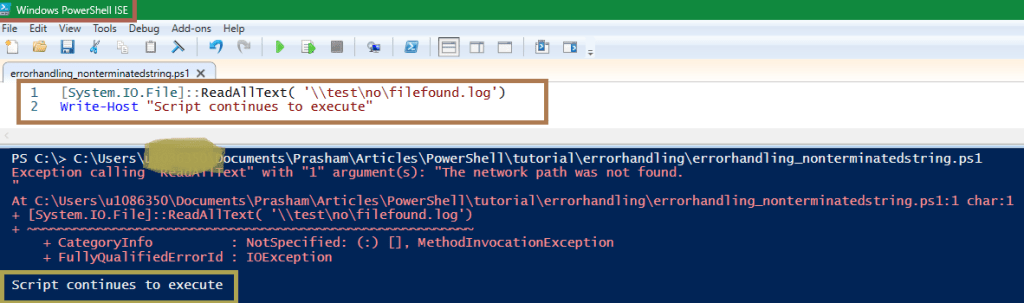
- In above example, even though exception occurs at first line – [System.IO.File]::ReadAllText( ‘\\test\no\filefound.log’), script execution continues.
- Next line in script get executed – Write-Host “Script continues to execute”
Try – Catch block
try
{
    our PowerShell CMDLETs
}
catch
{
    Write-Output "An exception occurred"
    Write-Output $_
}

Example:

try{
    [System.IO.File]::ReadAllText( '\\test\no\filefound.log')
}
catch{
    Write-Warning "Error occurred"
    Write-Output $_
}- In above example – we are explicitly generating exception by giving wrong path
- In catch block we displaying message with $_
- $_ object is of type ErrorRecord

- catch block only executes if there is terminating error
- Every exception in PowerShell have a type and we can catch specific exception as well as in below snap
try{
    [System.IO.File]::ReadAllText( '\\test\no\filefound.log')
}
catch [System.IO.FileNotFoundException]{
    Write-Warning "File not found exception"
    Write-Output $_
}
catch [System.IO.IOException]{
    Write-Warning "IO not found exception"
    Write-Output $_
}
catch{
    Write-Warning "Generic exception"
    Write-Output $_
}

Output:

WARNING: IO not found exception
The network path was not found.

At C:\Users\u1086350\Documents\Prasham\Articles\PowerShell\tutorial\errorhandling\errorhandling.ps1:2 char:5
+     [System.IO.File]::ReadAllText( '\\test\no\filefound.log')
+     ~~~~~~~~~~~~~~~~~~~~~~~~~~~~~~~~~~~~~~~~~~~~~~~~~~~~~~~~~
    + CategoryInfo          : NotSpecified: (:) [], IOException
    + FullyQualifiedErrorId : IOException
- Here, exception type is checked for each catch block until one is found
- Exceptions can inherit from other exceptions. In our example – FileNotFoundException is derived from IOException. So if IOException is first, then it would get called
- Error / Exception type is Microsoft .NET Framework exception or an exception derived from .NET exception
- Also, please note only one catch block is get called even though there are multiple matches
Best practices while handling errors in PowerShell script
- Always use Try / Catch / Finally block to handle critical / important / risky code
- Use Finally block to clean up the code / resources, to close the connections if opened
- Whenever possible, use / catch specific type of exception
- Display / log error messages whenever possible. This will help users to understand the error
- We could log the errors to text file / database / SharePoint lists
REFERENCES
- PowerShell tutorial – https://knowledge-junction.in/category/technology-articles/powershell-cmdlets/
- PowerShell tutorial – https://knowledge-junction.in/category/technology-articles/powershell-tutorial/
Thanks for reading ! Stay tuned for more articles on PowerShell !
HAPPY LEARNING AHEAD 🙂 LIFE IS BEAUTIFUL 🙂


You must be logged in to post a comment.