Azure – Networking – Part 5 – Basics of Azure Application Gateway

Hello Friends,
Let’s continue with Azure Network in this articles. Today in this article we will start with a very important topic of Networking is Azure Application Gateway. In this article we will discuss more on basics of Azure Application Gateway components.
Tool Installation Articles :
- Configure Azure Command Line Interface ( Azure CLI) On Windows
- Configure PowerShell For Microsoft Azure Az Module On Windows
Previous Azure series :
- Learn Basics Of Azure Networking In 60 Hours
- Learn Basic Of Azure Active Directory And Azure Identity And Access Management
- Azure DevOps – Learn at one place
If you have missed our previous articles on networking, please check them in following links.
Part 1 – Basics of Azure Networking
Part 2 – Azure Virtual Network (VNet)
Part 3 – Subnet in Azure Network
Part 4 – Network Security Group (NSG) in Azure
Next Article : Part 6 – Azure Application Gateway Features
Azure Application Gateway :
Azure Application Gateway is a web traffic load balancer that enables you to manage traffic to your web applications.(Referenced: Official Docs)
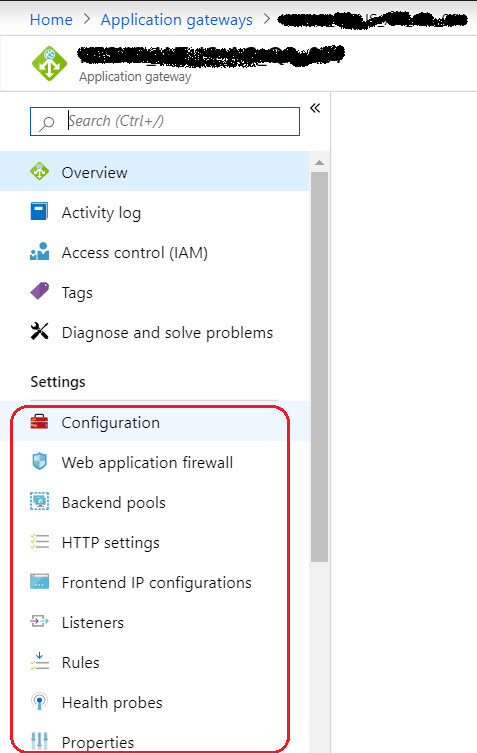
We can consider Application Gateway as an advance version of Load balancer which, comes with some extra useful features. The traditional load balancer supports OSI layer 4 with the TCP/UDP. But Application Gateway, supports OSI layer 7 and it works only with http/https protocols (port 80 and 443). With Application Gateway we can be more specific about the route to be followed and the destination to be reached. we can route the traffic based on the incoming URl. For example let’s consider one scenario, where our environment configured two different destination to handle to different requests like one will handle Image file request and the other one will handle Video file request . So here Application Gateway is smart enough, by taking the help of Listener and rules, route the traffic to the correct and accurate destination.

Application Gateway limits
The following table applies to v1, v2, Standard, and WAF SKUs unless otherwise stated. (Referenced: Official Docs)
| Resource | Default/maximum limit | Note |
|---|---|---|
| Azure Application Gateway | 1,000 per subscription | |
| Front-end IP configurations | 2 | 1 public and 1 private |
| Front-end ports | 1001 | |
| Back-end address pools | 1001 | |
| Back-end servers per pool | 1,200 | |
| HTTP listeners | 1001 | |
| HTTP load-balancing rules | 1001 | |
| Back-end HTTP settings | 1001 | |
| Instances per gateway | 32 | |
| SSL certificates | 1001 | 1 per HTTP listeners |
| Maximum SSL certificate size | V1 SKU – 10 KB V2 SKU – 16 KB | |
| Authentication certificates | 100 | |
| Trusted root certificates | 100 | |
| Request timeout minimum | 1 second | |
| Request timeout maximum | 24 hours | |
| Number of sites | 1001 | 1 per HTTP listeners |
| URL maps per listener | 1 | |
| Maximum path-based rules per URL map | 100 | |
| Redirect configurations | 1001 | |
| Concurrent WebSocket connections | Medium gateways 20k Large gateways 50k | |
| Maximum URL length | 8,000 | |
| Maximum file upload size, Standard | 2 GB | |
| Maximum file upload size WAF | Medium WAF gateways, 100 MB Large WAF gateways, 500 MB | |
| WAF body size limit, without files | 128 KB | |
| Maximum WAF custom rules | 100 |
In case of WAF-enabled SKUs, we recommend that you limit the number of resources to 40 for optimal performance.
Core Components of Azure Application Gateway :
Front-End IP :
Front-End IP is the entry point to an Application Gateway. Application Gateway can be configured with two front-end IP. One is for Public and the other onw is for Private. it means we can configure one IP to handle all Public traffic as showing in the following figure and also It can be configured with an Internet-facing VIP or with an internal endpoint that is not exposed to the Internet (by using a private IP for the front-end IP address), also known as an internal load balancer (ILB) endpoint.

Listener :
A listener is the most important part of Application Gateway. It listen to the traffic comes for a particular domain. The application gateway has capability to listen to multiple traffic . every traffic will be handle by a separate Listener. We can add multiple listener for a host to support traffics from different protocol (HTTP/HTTPS) and for different port. At the time of creation , we should upload certificate, if listener has created to listen HTTPS traffic.
When Listener receive the traffic, it try to communicate with the associated rule, to decide, where to redirect the traffic. If listener doesn’t find any custom rule associated with it then it will use the default rule .One Application Gateway has following two types of Listener.
Basic: A listener which listens to a single domain site where it has a single DNS mapping to IP address of the Application Gateway.
Multi-site: A listener which listens to a specific domain site(host). e.g production.mstech.in ,development.mstech.in ,QA.mstech.in etc.

Backend Pool :
Backend Pool is one or collection of resources which will serve the incoming traffic/requests. It refer to the host name or public IP of our app, which will address traffics. Backend shouldn’t be confused with our database tier, storage tier, and so on. It should be viewed/considered as the public endpoint of our application.


HTTP Settings :
Http Settings helps in validating the request if it is going to the correct backend pool or not. When we are creating a new Http Settings, we need to provide input like , Name, protocol,port, if it support cookie base affinity and custom probe etc. At the time of healthy instance selection this information takes a vital role. It is tied up to a custom domain url and the backend pool.When creating HTTPS setting — backend-certificate is required in “.cer”format.

Rules :
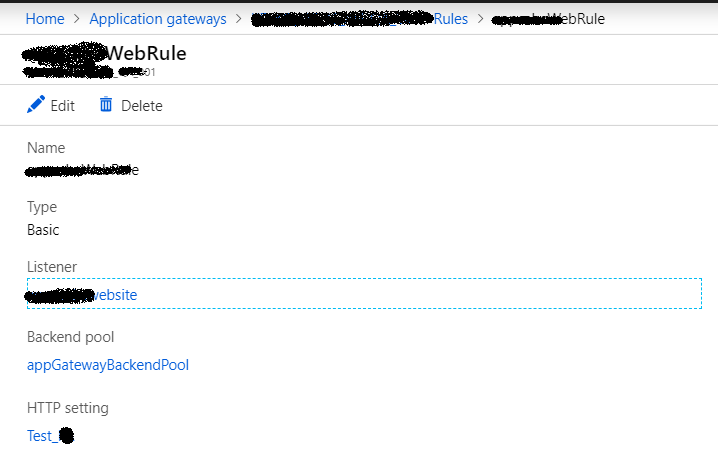
The most important component of the application gateway ,which decide what to do and when. Rules helps Application Gateway to route traffic to correct back-end pool . Rule works as a coordinator/bridge among , Listener, Http settings and Backend pool. It bind all of them in a string. So that every part of Application Gateway can communicate with each other to sharing required information.
Default Rule: For a listener (Eg: mstech.KJ.com/*) which backend pool should serve the request with the associated HTTP Setting.
Path Based Routing: Usually used in case of specific requests(Eg: mstech.KJ.com/Image/*). This rule gives us the flexibility to route the request to a specific backend pool based on the routing url.
Note: One Rule can be associated with one Listener .


Health Probe :
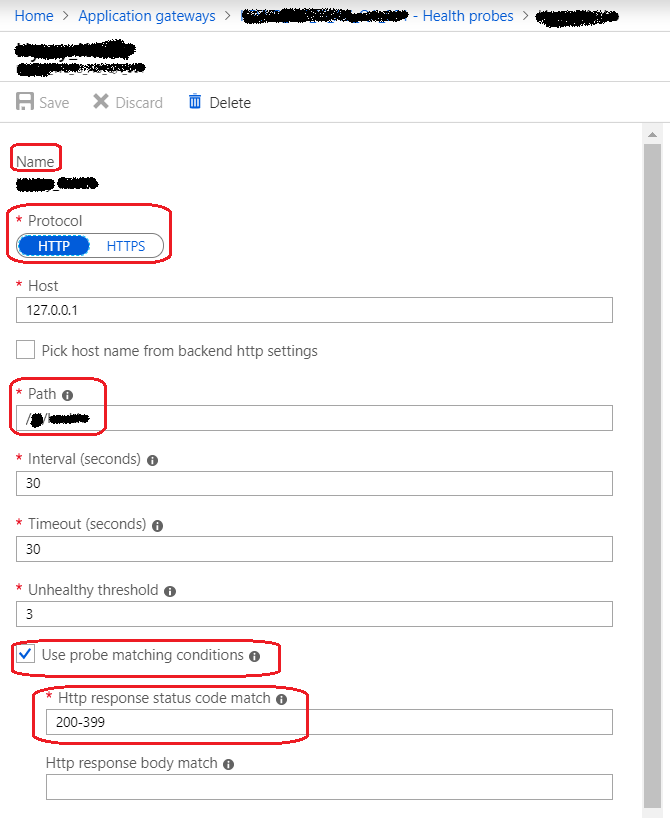
By default Azure Application Gateway monitors the health of all resources in its back-end pool and automatically removes any resource considered unhealthy from the pool. Application Gateway continues to monitor the unhealthy resources and adds them back to the healthy back-end pool once they become available and respond to health probes.
If there is any specific requirement, we can add custom health probe otherwise default health prove can be used. If there is no health prove configured for a Http Settings, then the default health prove will be used. The default health probe configured automatically with the creation of application gateway . Health probe report determine which backed pool instances will receive new flows.
An HTTP/HTTPS request to the back-end server configured for the back-end pool to monitor the health of the servers.
For example: Let’s consider our back-end pull has 3 servers server -1, server-2, and server-3 to receive HTTP network traffic on port 80. The health monitoring tests the three servers every 30 seconds for a healthy HTTP response. A healthy HTTP response has a status code between 200 and 399. If the status code doesn’t fall in between 200 and 399, then the response will be considered as unhealthy and the server will be out of pull till it return a healthy response.
If there is a network security group (NSG) on an application gateway subnet, port ranges 65503-65534 must be opened on the application gateway subnet for inbound traffic. These ports are required for the backend health API to work (Referenced: Official Microsoft Docs)


SUMMARY :
So What I understood here, After traffic received by Application Gateway, Listener route the incoming traffic to the healthy instance from right Backend pool by taking the information from Rule ( Http Setting info) and Http Settings (Health prove ,cookie based infinity,protocol,port etc …). After the application gateway finalize the backend server, it opens a new TCP session with the backend server based on HTTP settings. HTTP settings specify the protocol, port, and other routing-related settings that are required to establish a new session with the backend server ( From MS Doc). Once healthy instance of backend pool receive the traffic, it process the request and send back the response in same way as it came.
Useful Reference : https://docs.microsoft.com/en-in/azure/application-gateway/how-application-gateway-works
I hope this article gives a basic understanding about Application Gateway and In my next article , we will discuss on the features provided by Application Gateway. My next article of this series is Part 6 – Azure Application Gateway Features.
Thanks for reading 🙂
Keep reading, share your thoughts, experiences. Feel free to contact us to discuss more. If you have any suggestion / feedback / doubt, you are most welcome.
Stay tuned on Knowledge-Junction, will come up with more such articles.


![PowerShell : resolving error - Method invocation failed because [System.Management.Automation.PSObject] does not contain a method named 'op_Addition'](https://i0.wp.com/knowledge-junction.in/wp-content/uploads/2024/06/fig1.png?fit=944%2C103&ssl=1&resize=40%2C40)





6 Responses
[…] Next Article : Part 5 – Basics of Azure Application Gateway […]
[…] Part 5 – Basics of Azure Application Gateway […]
[…] Part 5 – Basics of Azure Application Gateway […]
[…] Part 5 – Basics of Azure Application Gateway […]
[…] Chapter 1 – Basics of Azure Application Gateway […]
[…] Chapter 5 – Basics of Azure Application Gateway […]