Kubernetes – kubectl command line utility

kubernetes components
Hi All,
Greetings for the day 🙂 LIFE IS BEAUTIFUL 🙂
We are discussing Docker and Kubernetes. In previous few articles we discussed
- What is Kubernetes ? – https://knowledge-junction.in/2021/09/03/kubernetes-introduction-starting-point-for-beginners-helps-to-prepare-the-interview/
- Setting up local environment for Kubernetes – https://knowledge-junction.in/2021/09/11/kubernetes-simplifying-setting-up-local-environment-creating-kubernetes-cluster-locally-helps-in-interview-preparation-kubernetes-for-beginners/
- Yaml file guide / reference – https://knowledge-junction.in/2021/09/04/complete-guide-to-yaml/
Today we will discuss very important command line utility – kubectl
What is kubectl ?
- Command line utility / tool which communicate with Kubernetes cluster
- This utility allows us to run commands against Kubernetes cluster
- Note : If you want to know what is Kubernetes cluster please have a look once – https://knowledge-junction.in/2021/09/11/kubernetes-simplifying-setting-up-local-environment-creating-kubernetes-cluster-locally-helps-in-interview-preparation-kubernetes-for-beginners/
- We could install kubectl on Linux / Windows / macOS – please refer the above article in which we are discussing how to install kubectl on Linux
What exactly happen when kubectl command is get executed ?
- First understand the term Kubernetes API :
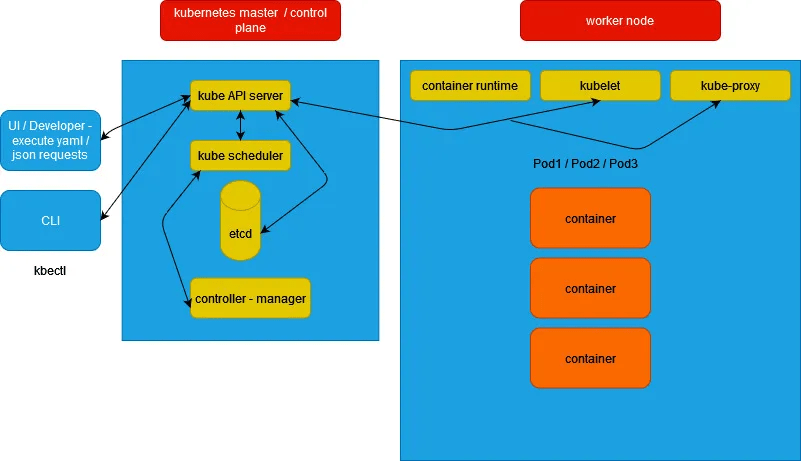
- If we have a look below diagram, one of the core component of Kubernetes control plane is “kube API server”
- API server exposes an HTTP API that allows users, different part of cluster and external components communicate with each other – we also called these API – Kubernetes API
- Kubernetes API is an HTTP REST API
- Kubernetes is fully controlled by these APIs
- These Kubernetes API allows us to query and manipulate state of API objects in kubernetes like Pods, Namespaces, Configmaps and so on – kubernetes operations
- All kubernetes operations exposes API end point
- We can find API endpoint for all kubernetes in API references
- So when we hit kubectl command kubectl makes HTTP POST request to respective operation API end point
- kubectl uses these Kubernetes API, most of the operations are performed by kubectl
- kubectl is CLI – command line interface which carries these HTTP API to the kubernetes API server as shown in below fig
Syntax for kubectl command:
kubectl [command] [TYPE] [NAME] [flags]where,
- command
- Operation which we want to perform
- Example : create, get, describe, delete etc
- TYPE
- Resource Type – Kubernetes objects
- Example : pod, deployment, namespace, replicaset, ingress etc
- To get all resource types we could execute CMDLET –
kubectl api-resources - Resource types are case sensitive
- we could specify singular , plural or abbreviated forms like pod / pods / po
- NAME
- Name of the resource
- Name is case-sensitive
- flags
- Optional flags
Some important kubectl commands :
- To get the cluster information
kubectl cluster-info- Create a following Kubernetes objects in default namespace :
- Node
- Pod
- Replica Set
- Deployment
kubectl create -f <Yammer definition file name of respective Kubernetes object>

Example:

kubectl create -f KnowledgeJunction-Pods-Definition-File.yaml

kubectl create -f KnowledgeJunction-ReplicaSets-Definition-File.yaml

kubectl create -f KnowledgeJunction-Depllyment-Definition-File.yaml

kubectl create -f KnowledgeJunction-Service-Definition-File.yaml

kubectl create -f KnowledgeJunction-Secret-Definition-File.yaml- To create kubernetes object in another namespace, we need to use –namespace option
kubectl create -f <Yammer definition file name of respective Kubernetes object> --namespace=<namespace name>- Get particular Kubernetes object lists from default namespace and hence the count
kubectl get <Kubernete Objects>

Example :

kubectl get nodes
kubctl get pods
kubectl get replicasets
kubctl get deployments
kubectl get svc
kubectl get namespace
kubectl get secrets- To verify multiple objects lists from default namespace in one command, seperate kubernetes objects by comma
kubectl get <Kubernetes Objects>, <Kubernetes Objects>

Example :

kubectl get pods, svc
- To know the docker image used by Kubernetes object from default namespace use – -o wide option to kubctl get command
kubectl get <Kubernetes Objects>, <Kubernetes Objects> -o wide

Example:

kubectl get pods
kubectl get pod pod1- To see all the kubernete objects from default namespace created at a time use – kubectl get all
kubectl get all- To list kubernetes object from another namespace use namespace option along with the name of namespace
kubectl get <Kubernetes Objects> -namespace=<namespace name>- Get details of Kubernetes object using describe parameter
kubectl describe <kubernetes object> <object-name>

Example:

kubectl describe deployment knowledgejunction-deployment # get the details of deployment kubernetes object - knowledjejunction deployment- Delete any kubernetes object
kubectl delete <objecttype> <objectname>

Example:

kubectl delete pod my-pod- Delete all Kubernetes objects
kubectl delete <objecttype> --all

Example:

kubectl delete pods --all- Check the status of Kubernetes Deployment object
kubectl rollout status deployment.apps/<deployment-name>

Example:

kubectl rollout status deployment.apps/knowledgeJunction-deployment- To check / verify the history of deployments
kubectl rollout history deployment.apps/<deployment-name>

Example:

kubectl rollout history deployment.apps/knowledgeJunction-deployment- To deploy application in cluster
kubectl run <application name> / <docker container>

Example:

kubectl run - To switch the default namespace permanently use => kubectl config command with namespace parameter having namespace name
kubectl config set-context $(kubectl config current-context) --namespace=devThanks for reading ! HAVE A FANTASTIC TIME AHEAD !!


You must be logged in to post a comment.