Microsoft 365 : Microsoft Stream (on SharePoint) – Important setting to (default destination of the Stream tile in Microsoft 365 app launcher) – direct the Stream app tile launcher to new Stream (on SharePoint) – till classic Stream retires

SharePoint admin center - Setting for default destination for Streams app
Hi All,
Greetings for the day!!!
Background
- As Stream (Classic) is transitioning to Stream (on SharePoint)
- Until Stream (classic) is retiring we can take decision which stream experience is appropriate for users in our organization
- We have setting in SharePoint admin center for default destination of the Stream tile in Microsoft 365 app launcher

Updating the setting for default destination for Stream tile in SharePoint admin center
- Navigate to SharePoint admin center
- We could navigate SharePoint admin center with following ways
- By direct URL – https://<tenant-name>-admin.sharepoint.com/ Example – https://knowledgejunction1-admin.sharepoint.com/_layouts/15/online/AdminHome.aspx#/home
- From Microsoft 365 admin center
- We have detailed article on how to navigate – SharePoint admin center – https://knowledge-junction.in/2022/12/07/small-tips-and-tricks-sharepoint-admin-center-how-to-navigate-to-sharepoint-admin-center/
- Once we are on SharePoint admin center home as
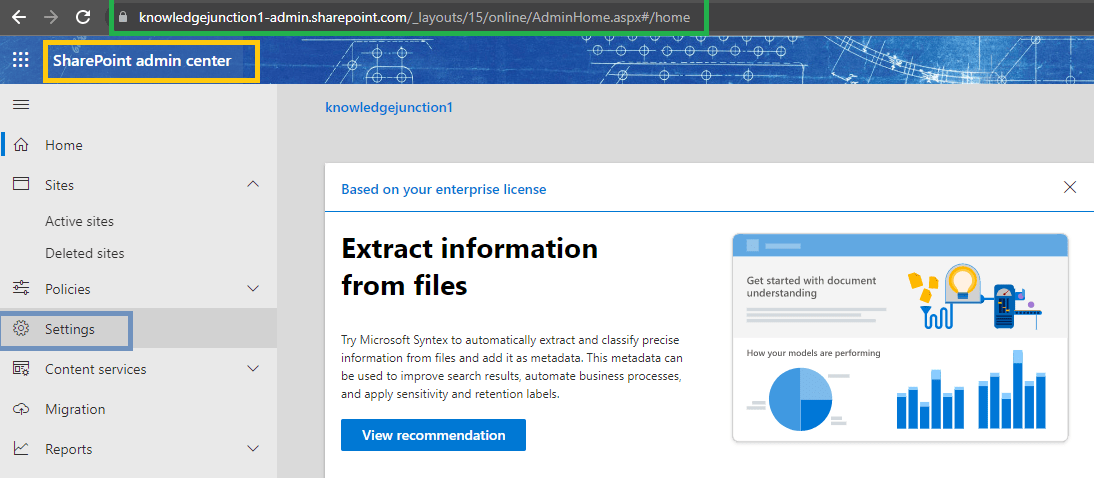
- From left pane click on “Settings” link / menu
- On click of we will be navigated to “Settings” blade (_layouts/15/online/AdminHome.aspx#/settings) – https://knowledgejunction1-admin.sharepoint.com/_layouts/15/online/AdminHome.aspx#/settings

- From the right pane click on “Streams”
- We will be navigated to “StreamStartPage” blade (_layouts/15/online/AdminHome.aspx#/settings/StreamStartPage) and right pane “https://knowledgejunction1-admin.sharepoint.com/_layouts/15/online/AdminHome.aspx#/settings/StreamStartPage” – “Stream app launcher tile” will open as

- Since Stream (classic) is expiring its time to have either first or second option for Streams from the above settings
- We should start using new Streams – Streams (on SharePoint) ASAP if not started
- First option – “Automatically switch to the new Stream (on SharePoint) when recommended” is default one
- Default option means – If we select this option or don’t change it, then Microsoft will decide the default Stream experience when users select the Stream tile
Thanks for reading !!! HAVE A FANTASTIC LEARNING AHEAD!!!


![PowerShell : resolving error - Method invocation failed because [System.Management.Automation.PSObject] does not contain a method named 'op_Addition'](https://i0.wp.com/knowledge-junction.in/wp-content/uploads/2024/06/fig1.png?fit=944%2C103&ssl=1&resize=40%2C40)
1 Response
[…] We have detailed article for above setting, please have a look – Microsoft 365 : Microsoft Stream (on SharePoint) – Important setting to (default destination of the Stream tile in Microsoft 365 app launcher) – direct the Stream app tile launcher to new Stream (on SharePoint) – till classic Stream retires – https://knowledge-junction.in/2023/05/05/microsoft-365-microsoft-stream-on-sharepoint-important-sett… […]