M365 – SharePoint online – SharePoint app bar is now available on modern Communication and Team sites

SharePoint app bar - Home icon showing Global Navigation
Hi All,
Greetings for the day 🙂 LIFE IS BEAUTIFUL 🙂 I hope we all are safe 🙂 STAY SAFE, STAY HEALTHY 🙂
Today new feature 🙂
SharePoint modern communication and team sites will soon feature the SharePoint app bar which provides quick access to customizable global navigation as well as other intranet resources.
What is SharePoint app bar :
- The SharePoint app bar is way to find few details like personalized sites, news, files and SharePoint home page where user can access News, Frequent sites, Featured links, Followed sites, from where if user has permission can create sites, can create new news posts
- SharePoint app bar appears at left side on the site as shown in below Fig

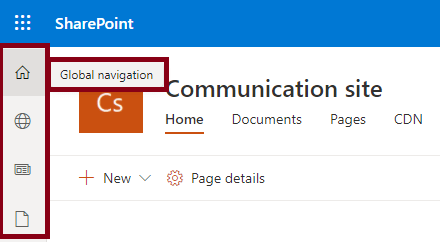
- SharePoint app bar appears on every page basically on site. So that user can easily navigate to important content and resources from any where in the SharePoint as shown in above Fig
- Currently there are following 4 features / tabs available in SharePoint app bar
- Global Navigation / SharePoint start page => If Global navigation is disabled or not configured, the home icon links to SharePoint start page. To enable global navigation respective communication site is need to set as Home site. We have separate article – M365 – SharePoint Online – Enabling Global Navigation
- Personalized sites
- News
- Files
- Specific tab can not be disabled in SharePoint app bar
- Currently today SharePoint app bar is not visible on classic sites
- Personalized content in the SharePoint app bar is enabled by Microsoft Graph
- When Microsoft Graph is disabled, the news and sites experience will be degraded
This change is associated with Microsoft 365 Roadmap ID 70576

Timings:
- Targeted release (organization): early March through mid-March
- Targeted release (special user): early March through mid-March
- Standard release: mid-March through mid-April
We may need to update our organization documentation for all users or need to have training for the users so that they wont surprise with the change 🙂
Reference:
Thanks for reading 🙂 If its worth at least reading once, kindly please like and share 🙂 SHARING IS CARING 🙂
Share In Teams:Enjoy the beautiful life 🙂 Have a FUN 🙂 HAVE A SAFE LIFE 🙂 TAKE CARE 🙂


You must be logged in to post a comment.