Microsoft 365 / Groups – Teams Governance : Enforcing naming policies from Azure Active Directory admin center

Microsoft 365 admin center - Azure Active Directory admin center - Groups naming policy

Hi All,

Greetings for the day 🙂 LIFE IS BEAUTIFUL 🙂

Since last couple of months we are discussing Microsoft Teams and from previous article we started discussing Teams Governance – Microsoft Teams – Governance – Part 1 – Preparation / Plan

In this article we will discuss how to set naming policies while creating Group / Team from Azure Active Directory admin center – here we are discussing only OOB approaches available.

Details :

Microsoft 365 admin center - navigating to "Azure Active Directory" admin center
fig : Microsoft 365 admin center – navigating to “Azure Active Directory” admin center
  • Once we are in “Azure Active Directory” admin center, from left navigation pane click on “Groups
Microsoft 365 admin center - Azure Active Directory admin center - Groups
fig : Microsoft 365 admin center – Azure Active Directory admin center – Groups
  • We will be redirected to “AllGroups” blade as
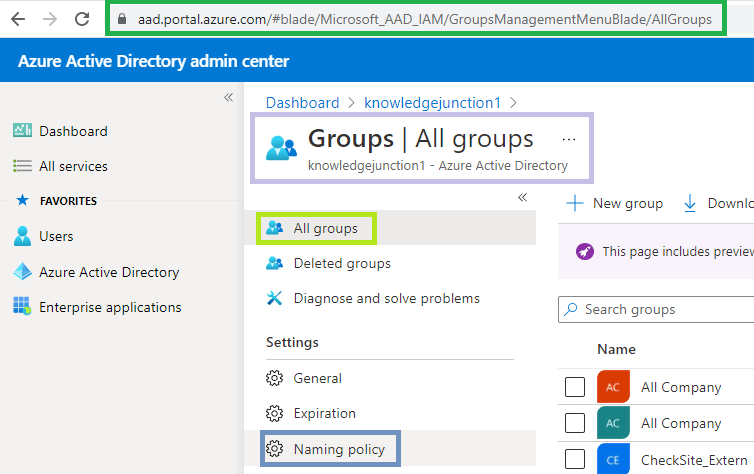
fig : Microsoft 365 admin center - Azure Active Directory admin center - AllGroups blade
fig : Microsoft 365 admin center – Azure Active Directory admin center – AllGroups blade
  • Click on “Naming policy” link form left pane as shown in above fig
  • We will be redirected to – “NamingPolicy” menu blade as
Microsoft 365 admin center - Azure Active Directory admin center - Groups - NamingPolicy blade
fig : Microsoft 365 admin center – Azure Active Directory admin center – Groups – NamingPolicy blade
  • From NamingPolicy menu page we have two options there :
    • Either we could block words which our organization does not want in Group / Teams name
      • We could do this by uploading “Download.csv” / “BlockedWords.csv” file with the blocked words
      • Here I have uploaded the “Download.csv” / “BlockedWords.csv” file with two words => Tea and Coffee
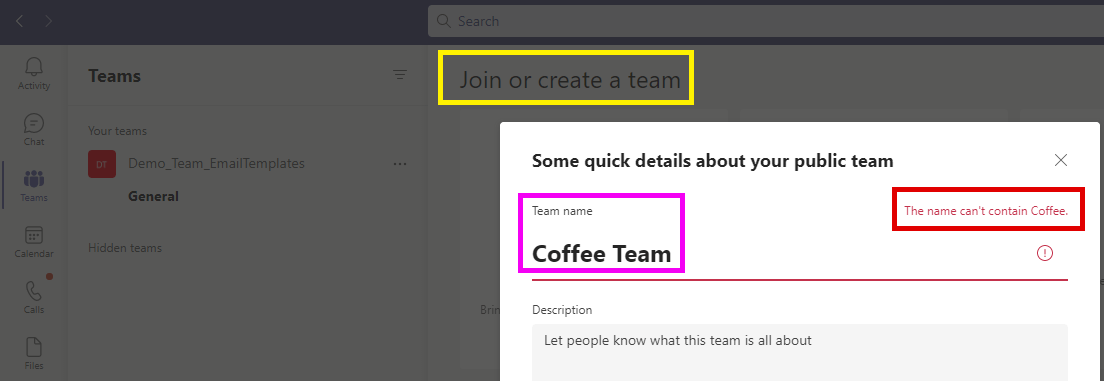
      • When I create Teams with the above two words, I could not create the Team, we will receive an error

Microsoft 365 admin center - Azure Active Directory admin center - Groups naming policy - Blocked words CSV file
fig : Microsoft 365 admin center – Azure Active Directory admin center – Groups naming policy – Blocked words CSV file

The name can’t contain coffee

fig : Microsoft 365 admin center - Azure Active Directory admin center - Group naming policy - Blocked word error while creating Team
fig : Microsoft 365 admin center – Azure Active Directory admin center – Group naming policy – Blocked word error while creating Team
  • There is another option to add Prefix / Suffix to Team Names as
fig : Microsoft 365 admin center - Azure Active Directory admin center - Groups naming policy - Setting prefix
fig : Microsoft 365 admin center – Azure Active Directory admin center – Groups naming policy – Setting prefix – KnowledgeJunction
  • So when we will create Teams we need to prefix the Team name with prefix – “KnowledgeJunction” <Team name>
  • If we wont prefix “KnowledgeJunction” we will receive an error, we wont allow to create Teams

The team prefix or suffix is incorrect, please try again
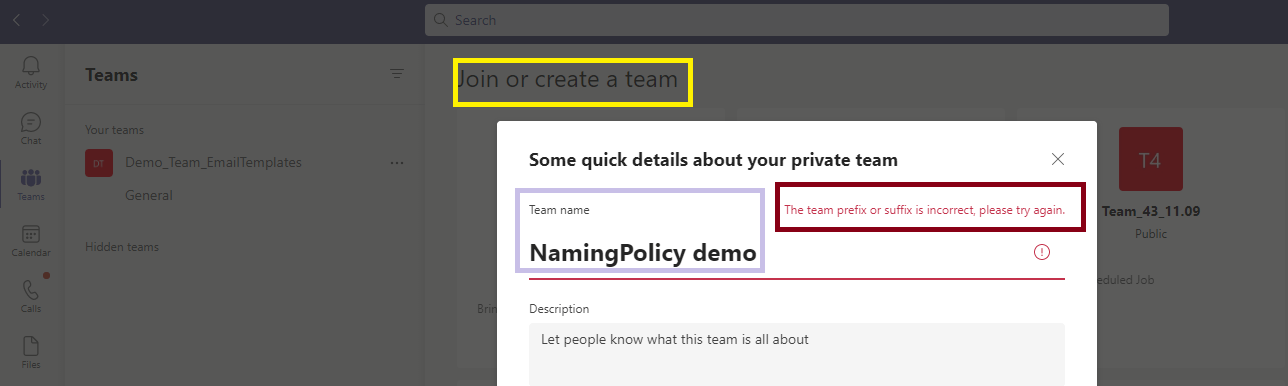
Microsoft 365 admin center - Azure Active Directory admin center - Group naming policy error
fig : Microsoft 365 admin center – Azure Active Directory admin center – Group naming policy error

Thanks for reading 🙂 STAY HAPPY 🙂 STAY HEALTHY 🙂

Prasham Sabadra

LIFE IS VERY BEAUTIFUL. ENJOY THE WHOLE JOURNEY :) Founder of Microsoft 365 Junction, Speaker, Author, Learner, Developer, Passionate Techie. Certified Professional Workshop Facilitator / Public Speaker. Believe in knowledge sharing. Around 20+ years of total IT experience and 17+ years of experience in SharePoint and Microsoft 365 services Please feel free me to contact for any SharePoint / Microsoft 365 queries. I am also very much interested in behavioral (life changing) sessions like motivational speeches, Success, Goal Setting, About Life, How to live Life etc. My book - Microsoft 365 Power Shell hand book for Administrators and Beginners and 100 Power Shell Interview Questions - https://www.amazon.in/Microsoft-Administrators-Beginners-Interview-Questions/dp/9394901639/ref=tmm_pap_swatch_0?_encoding=UTF8&qid=1679029081&sr=8-11

You may also like...

Leave a Reply

This site uses Akismet to reduce spam. Learn how your comment data is processed.

Discover more from Microsoft 365

Subscribe now to keep reading and get access to the full archive.

Continue reading