Microsoft 365 – Deleting Microsoft 365 group using PowerShell

Microsoft 365 – Deleting Microsoft 365 group using PowerShell
Hi All,
Greetings for the day!!!
Today one more PowerShell script.
Background / Use Case
- For testing purpose we have created few around 5000 thousands of Microsoft 365 group in our dev tenant

- After our testing we need to clean up those group
- So we write PowerShell script to cleanup those groups and hence sharing
- We have prepared CSV file for Microsoft 365 groups which we need to remove from our dev tenant
- Following is sample CSV file
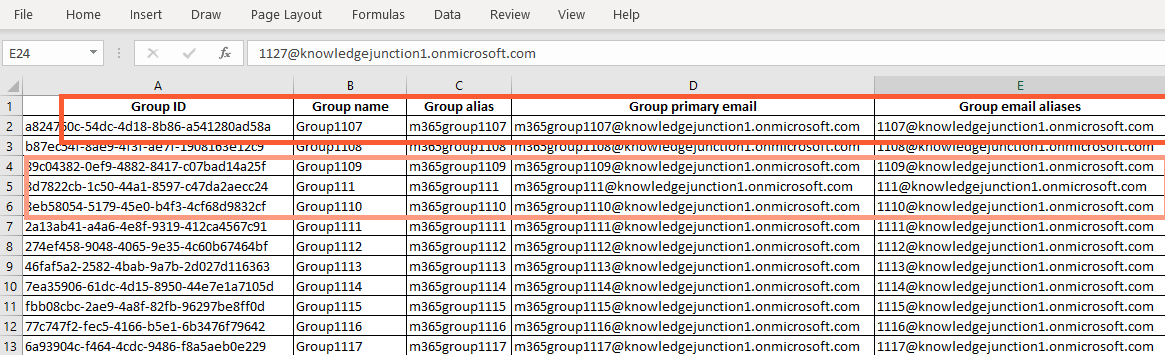
Detailed Steps
- Connect to Exchange Online using PowerShell CMDLET – Connect-ExchangeOnline
Connect-ExchangeOnline
- This CMDLET will prompt for credentials – “Sign in to your account” dialog will appear as

- Read / Import the CSV file using Import-CSV CMDLET
$m365Groups = Import-CSV -Path "C:\Prasham\Articles\PowerShell\deletinggroups\Groups.csv"- Loop through all the groups in CSV file and remove those using the CMDLET – Remove-UnifiedGroup
$m365Groups | ForEach {

    #Delete the Microsoft 365 Group
    #"Group primary email" - column name in CSV file for primary email address of
        Microsoft 365 group

    Remove-UnifiedGroup -Identity $m365Groups."Group primary email" -confirm:$False
}
Remove-UnifiedGroup
- This cmdlet is available only in the cloud-based service
- We can’t use this CMDLET to remove Microsoft 365 Groups if we connect using certificate based authentication (also known as CBA or app-only authentication for unattended scripts). We can use Microsoft Graph.
- Syntax
Remove-UnifiedGroup
      [-Identity] <UnifiedGroupIdParameter>
      [-Confirm]
      [-Force]
      [-WhatIf]
[<CommonParameters>]- Here, Identity parameter specifies Microsoft 365 group which we need to remove. We can use any value from following listing which uniquely identifies the respective group
- Name
- Alias
- Distinguished name (DN)
- Canonical DN
- Email address
- GUID
COMPLETE POWERSHELL SCRIPT
<#
    .SYNOPSIS
    Reads the CSV file having Microsoft 365 Groups which we need to delete
    and removes the respective groups from our Microsoft 365 tenant

    .EXAMPLE
     Remove-UnifiedGroup -Identity m365group1107@knowledgejunction1.onmicrosoft.com -
     confirm:$False

    .LINK
    https://learn.microsoft.com/en-us/powershell/module/exchange/remove-unifiedgroup?
    view=exchange-ps
#>

#Check if "ExchangePowerShell" module is installed / available
if(-not (Get-Module ExchangePowerShell -ListAvailable)){
    Install-Module ExchangePowerShell -Scope CurrentUser -Force
    }

#import the CSV file
$m365Groups = Import-CSV -Path "C:\Prasham\Articles\PowerShell\deletinggroups\Groups.csv"

#Connect to Exchange Online
Connect-ExchangeOnline

#Example -
#Remove-UnifiedGroup -Identity m365group1107@knowledgejunction1.onmicrosoft.com -confirm:$False

$m365Groups | ForEach {
    #Delete the Microsoft 365 Group
    #"Group name" - column name in CSV file for group name of
      Microsoft 365 group

    #$m365Groups."Group name"

    #get the group name
    $groupName = $_."Group name"

    #remove
    Remove-UnifiedGroup -Identity $groupName -confirm:$False
}

#Disconnect Exchange Online
Disconnect-ExchangeOnline -Confirm:$False
REFERENCES
Thanks for reading the article !!! Please feel free to discuss in case any issues / suggestions / thoughts / questions !!!
HAVE A GREAT TIME AHEAD !!! LIFE IS BEAUTIFUL 🙂


You must be logged in to post a comment.