PowerShell – Exploring Module CMDLETs

Hi All,
Greetings for the day! LIFE IS BEAUTIFUL 🙂
Today in this article we will discuss Module related PowerShell CMDLETs. You will find these in various articles but here we try to put all together at one place
What are PowerShell modules
- A PowerShell module can be defined as a set of PowerShell functions, CMDLETs that are grouped to manage all the aspects of a particular feature
- In more simple terms its package of PowerShell functions, CMDLETs, variables, providers, aliases, and workflows (basically PowerShell members)
- These modules then used as reference in other PowerShell scripts
- We can share these PowerShell modules with others
- Example: We could see all installed module using – Get-Module CMDLET
- A PowerShell module contains four essential elements:
- PSM file, which is the module
- Help files or scripts needed by the module.
- A manifest file that describes the module and
- A directory that stores the content
- A PowerShell module can be one of four types:
- Script module: A PSM1 file that contains various functions to enable admins to perform import, export, and management functions
- Binary module: A .NET framework assembly (DLL file) that contains compiled code. Developers typically use a binary module to create cmdlets with powerful features not easily done with a PowerShell script.
- Manifest module: A manifest module is a module (PSM1) file with an associated PSD1 file (manifest).
- Dynamic module: A dynamic module is created dynamically on demand by a script. It isn’t stored or loaded to persistent storage.
Important Module CMDLETs
Install-Module
- Downloads one or more modules from a online repository, and installs them on the local computer.
- Syntax
Install-Module
       [-Name] <String[]>
       [-MinimumVersion <String>]
       [-MaximumVersion <String>]
       [-RequiredVersion <String>]
       [-Repository <String[]>]
       [-Credential <PSCredential>]
       [-Scope <String>]
       [-Proxy <Uri>]
       [-ProxyCredential <PSCredential>]
       [-AllowClobber]
       [-SkipPublisherCheck]
       [-Force]
       [-AllowPrerelease]
       [-AcceptLicense]
       [-PassThru]
       [-WhatIf]
       [-Confirm]
       [<CommonParameters>]
Install-Module
[-InputObject] <PSObject[]>
[-Credential <PSCredential>]
[-Scope <String>]
[-Proxy <Uri>]
[-ProxyCredential <PSCredential>]
[-AllowClobber]
[-SkipPublisherCheck]
[-Force]
[-AcceptLicense]
[-PassThru]
[-WhatIf]
[-Confirm]
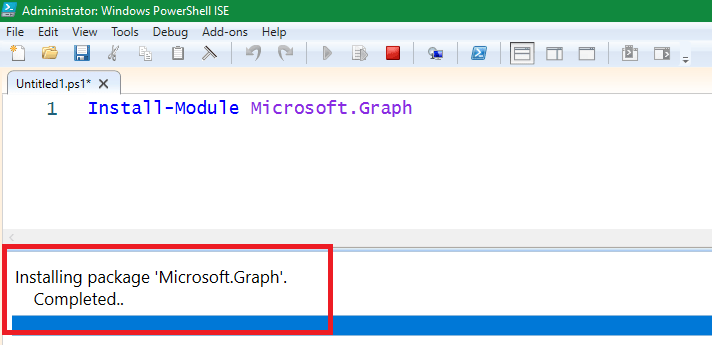
[<CommonParameters>]Example – Installing “Microsoft Graph” module

Import-Module
- When first time we run the command from any PowerShell module, that module imported automatically
- Only modules that are stored in the location specified by the PSModulePath environment variable are automatically imported
- Modules which are located other locations which we need import explicitly
- Also commands that uses PowerShell providers are not imported automatically
Import-Module
      [-Global]
      [-Prefix <String>]
      [-Name] <String[]>
      [-Function <String[]>]
      [-Cmdlet <String[]>]
      [-Variable <String[]>]
      [-Alias <String[]>]
      [-Force]
      [-SkipEditionCheck]
      [-PassThru]
      [-AsCustomObject]
      [-MinimumVersion <Version>]
      [-MaximumVersion <String>]
      [-RequiredVersion <Version>]
      [-ArgumentList <Object[]>]
      [-DisableNameChecking]
      [-NoClobber]
      [-Scope <String>]
      [<CommonParameters>]
Import-Module
[-Global]
[-Prefix <String>]
[-Name] <String[]>
[-Function <String[]>]
[-Cmdlet <String[]>]
[-Variable <String[]>]
[-Alias <String[]>]
[-Force]
[-SkipEditionCheck]
[-PassThru]
[-AsCustomObject]
[-MinimumVersion <Version>]
[-MaximumVersion <String>]
[-RequiredVersion <Version>]
[-ArgumentList <Object[]>]
[-DisableNameChecking]
[-NoClobber]
[-Scope <String>]
-PSSession <PSSession>
[<CommonParameters>]Example : Importing “ExchangeOnlineManagement” module
Import-Module ExchangeOnlineManagement Get-Module
- List all installed modules
Get-Module -All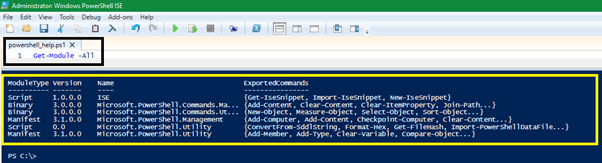
Find-Module
- Find modules in repository
Find-Modulereturns a PSRepositoryItemInfo object for each module it findsFind-Modulereturns the newest version of a module if no parameters are used that limit the version- To get a repository’s list of a module’s versions, use the parameter AllVersions.
- Syntax
Find-Module
    [[-Name] <string[]>]
    [-MinimumVersion <string>]
    [-MaximumVersion <string>]
    [-RequiredVersion <string>]
    [-AllVersions]
    [-IncludeDependencies]
    [-Filter <string>]
    [-Tag <string[]>]
    [-Includes <string[]>]
    [-DscResource <string[]>]
    [-RoleCapability <string[]>]
    [-Command <string[]>]
    [-Proxy <uri>]
    [-ProxyCredential <pscredential>]
    [-Repository <string[]>]
    [-Credential <pscredential>]
    [-AllowPrerelease]
    [<CommonParameters>]
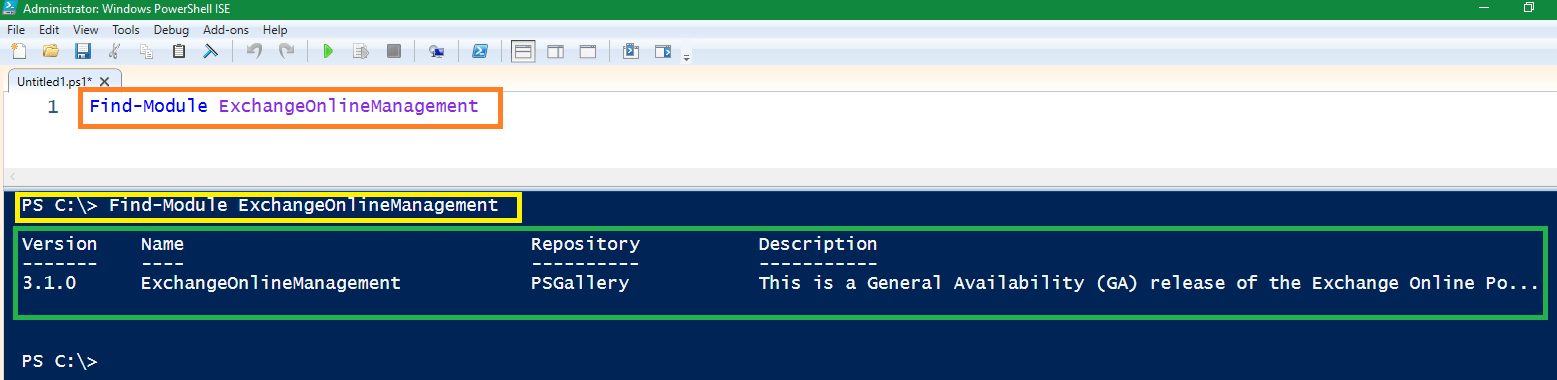
Example – Lets find the module – ExhangeOnlineManagement
Uninstall-Module
- The
Uninstall-Modulecmdlet uninstalls a specified module from the local computer - We can’t uninstall a module if other modules depend on it or the module wasn’t installed with the
Install-Modulecmdlet.
Uninstall-Module
         [-Name] <String[]>
         [-MinimumVersion <String>]
         [-RequiredVersion <String>]
         [-MaximumVersion <String>]
         [-AllVersions]
         [-Force]
         [-AllowPrerelease]
         [-WhatIf]
         [-Confirm]
         [<CommonParameters>]
Uninstall-Module
[-InputObject] <PSObject[]>
[-Force]
[-WhatIf]
[-Confirm]
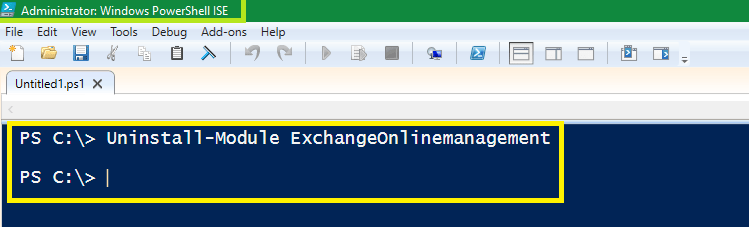
[<CommonParameters>]Example – Uninstalling module “ExchangeOnlinemanagement“
How to know all the commands in Module
- We could use Get-Command CMDLET to know all the commands from the module
Get-Command -Module <module-name>

Get-Command -Module Microsoft.Online.SharePoint.PowerShell

We have around 200+ PowerShell CMDLETs. Specially for Microsoft 365 / SharePoint. Please have a look – https://knowledge-junction.in/category/technology-articles/powershell-cmdlets/
REFERENCES
Thanks for reading!!! HAVE A FANTASTIC TIME AHEAD ! ENJOY BEAUTIFUL LIFE 🙂


16 Responses
[…] We have detailed article on PowerShell modules CMDLETs – PowerShell – Exploring Module CMDLETs – https://knowledge-junction.in/2022/12/12/__trashed-2/ […]
[…] PowerShell – Exploring Module CMDLETs – https://microsoft365junction.com/2022/12/12/__trashed-2/ […]
[…] We have detailed article on PowerShell modules CMDLETs – PowerShell – Exploring Module CMDLETs – https://microsoft365junction.com/2022/12/12/__trashed-2/ […]
[…] For more details on PowerShell Modules, please have a look – PowerShell – Exploring Module CMDLETs – https://microsoft365junction.com/2022/12/12/__trashed-2/ […]
[…] We have detailed article on PowerShell Modules. PowerShell – Exploring Module CMDLETs – https://knowledge-junction.in/2022/12/12/__trashed-2/ […]
[…] For more details on PowerShell Modules, please have a look – PowerShell – Exploring Module CMDLETs – https://knowledge-junction.in/2022/12/12/__trashed-2/ […]
[…] PowerShell – Exploring Module CMDLETs – https://knowledge-junction.in/2022/12/12/__trashed-2/ […]
[…] We have detailed article on PowerShell modules. PowerShell – Exploring Module CMDLETs – https://microsoft365junction.com/2022/12/12/__trashed-2/ […]
[…] PowerShell – Exploring Module CMDLETs – https://microsoft365junction.com/2022/12/12/__trashed-2/ […]
[…] PowerShell – Exploring Module CMDLETs – https://microsoft365junction.com/2022/12/12/__trashed-2/ […]
[…] PowerShell – Exploring Module CMDLETs – https://microsoft365junction.com/2022/12/12/__trashed-2/ […]
[…] PowerShell – Exploring Module CMDLETs – https://microsoft365junction.com/2022/12/12/__trashed-2/ […]
[…] PowerShell – Exploring Module CMDLETs – https://microsoft365junction.com/2022/12/12/__trashed-2/ […]
[…] PowerShell – Exploring Module CMDLETs – https://knowledge-junction.in/2022/12/12/__trashed-2/ […]
[…] We have detailed article to explore PowerShell modules. Please have a look once. https://knowledge-junction.in/2022/12/12/__trashed-2/ […]
[…] PowerShell – Exploring Module CMDLETs – https://knowledge-junction.in/2022/12/12/__trashed-2/ […]