SharePoint OnPremises – Get-SPWeb – resolving error – Access to this Web site has been blocked

Hi All,
Greetings for the day 🙂 LIFE IS BEAUTIFUL 🙂
SharePoint migration contiues 🙂 Today new issue and solution 🙂
Background / Details : We are trying to access one of our SharePoint 2013 SiteCollection. We are using PowerShell CMDLET – Get-SPWeb and we are getting an error.
We tried to access the SiteCollection from browser and same error.
So in this article will discuss root cause of error and solution 🙂
Error :
Get-SPWeb : Access to this Web site has been blocked. Please contact the administrator to resolve this problem.
At line:1 char:10
Get-SPWeb <<<< -Limit All -Site <SiteCollectionURL>
CategoryInfo : InvalidData: (Microsoft.Share….SPCmdletGetWeb:SPCmdletGetWeb) [Get-
SPWeb], SPException
FullyQualifiedErrorId : Microsoft.SharePoint.PowerShell.SPCmdletGetWeb

Solution :
- This error occurs because respective web site is locked
- We can check or update the web lock status either through PowerShell or Central Administration
- We have an article for PowerShell script to change the lock state of Site or all sites in given web application, please have a look – SharePoint On-premises – PowerShell script to unlock all site collections in Web Application
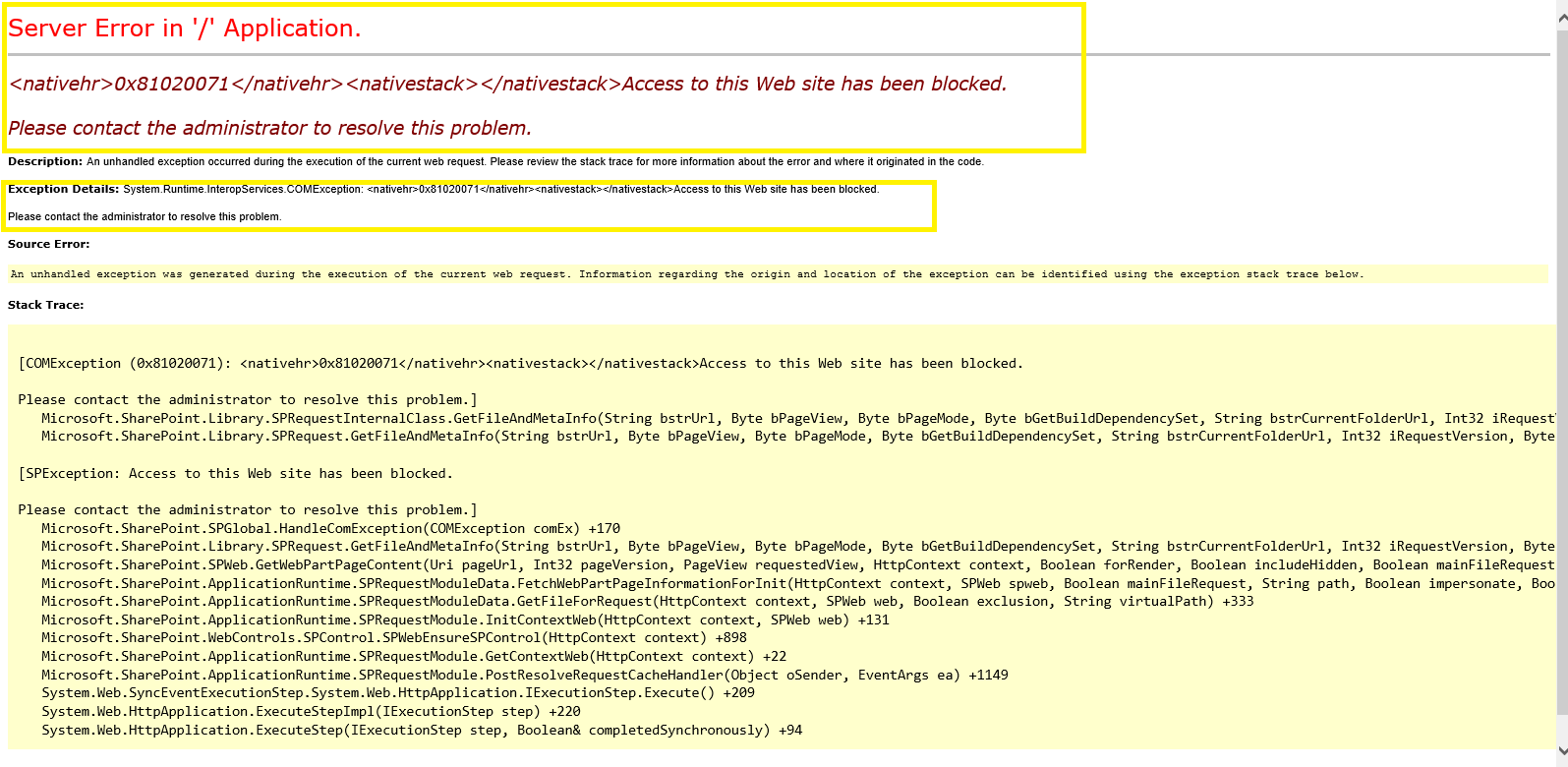
- Also when we try access the locked site from browser we get an error as shown in below fig
Verifying and Updating lock status for Site from Central Administration :
- Open the central administration
- Navigate to – Application Management

- We will be redirected to applications.aspx page as shown in below Fig
- Click on “Configure quotas and locks” link as shown in below Fig
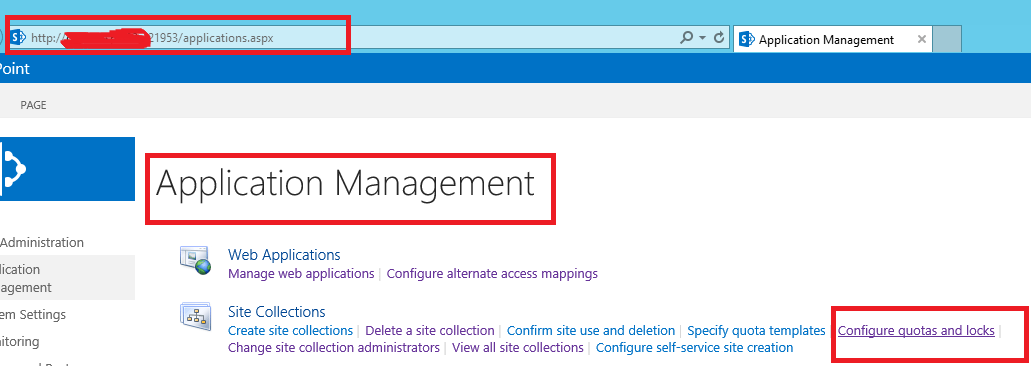
- From application management page we will navigate to “Site Collection Quotas and Locks” – sitequota.aspx page as shown in below fig

- On “Site Collection Quotas and Locks” page we will have option to select the site collection and check the “Site Lock Information“
- From the same page we could also update the Lock status for the selected site
- If Site Lock Status is “No access” and if we try to access the Site either through browser or PowerShell we get an error – Access to this Web site has been blocked. Please contact the administrator to resolve this problem.
- To access the site please change the appropriate site status (lock state) as per our organization requirement
- Following are details for possible lock state values :
- Not locked / Unlock => unlock the site collection and make it available to users
- Adding content prevented / NoAdditions => prevent users from adding new content to site collection. Updates and deletions are still allowed
- ReadOnly => prevent users from adding, updating, or deleting content
- NoAccess => prevent users from accessing site collection and its content. Users who attempt to access the site receive an above error message
Thanks for reading 🙂 If its worth at least reading once, kindly please like and share 🙂 SHARING IS CARING 🙂
Enjoy the beautiful life 🙂 Have a FUN 🙂 HAVE A SAFE LIFE 🙂 TAKE CARE 🙂


You must be logged in to post a comment.