M365 / Microsoft Teams – Introduction to Microsoft Teams – for beginners / Administrators – Part 4 – Team Templates

M365 - Microsoft Teams - Teams admin center - Team templates
Hi All,
Greetings for the day 🙂 LIFE IS BEAUTIFUL 🙂
Microsoft Teams learning / understanding continues. Today new Microsoft Teams feature – Team Templates.
Take away from this article
- What are Microsoft Team templates
- OOB Team templates available
- Creating Team using OOB team template
- Team Templates from Teams admin center
Details
- Team templates are pre-built definitions of teams structure
- Different team template comes with different channels and apps
- We can have our custom team template either from existing team template, team or we can develop from scratch as well
- When we create teams we have an option to select the team template as shown in below fig. Please notice here we are creating team from Teams desktop client

- Microsoft provides / publishes few OOB templates with default channels and apps as shown in above fig.
- Below table with details of OOB templates available from Microsoft
| Template Name | Channels | Apps | Description |
|---|---|---|---|
| Manage a Project | General Announcements 📢 Resources Planning | Approvals Lists OneNote Power Automate Tasks by Planner and To Do Wiki | Manage tasks, share documents, conduct project meetings and document risks and decisions with this template for general project management. |
| Manage an Event | General Announcements 📢 Budget Content Logistics Planning Marketing and PR | Approvals Employee ideas Issue reporting OneNote Power Automate Tasks by Planner and To Do Website Wiki YouTube | Manage tasks, documents, and collaborate on everything you need to deliver a compelling event. |
| Onboard Employees | General Announcements 📢 Employee Chat Training | Communities Employee ideas Power Automate Tasks by Planner and To Do Wiki | Improve your culture and streamline your employee onboarding with this central team for resources, questions, and a bit of fun. |
| Adopt Office 365 | General Announcements 📢 Champions Corner Team Forms Calendar | Channel calendar Wiki | Help build, grow, and sustain your Champions community rollout by evangelizing and helping your peers with the new technology. |
| Organize Help Desk | General Announcements 📢 FAQ | Issue reporting OneNote Power Automate Praise Tasks by Planner and To Do Wiki | Collaborate on documentation, policy, and processes that support your help desk. |
| Incident Response | General Announcements 📢 Logistics Planning Recovery Urgent | Approvals Excel Inspection OneNote Power Automate SharePoint Tasks by Planner and To Do Wiki | Centralize communication and critical resources for your crisis management or incident response team. |
| Global Crisis or Event | General Announcements 📢 World News Business Continuity Remote Working Internal Comms External Comms Approvals Request Customer Complaints Kudos Executive Update | Approvals Issue reporting Praise Tasks by Planner and To Do Website Wiki | Create a place for your team to coordinate on a major crisis. |
| Organize a Store | General Shift Handoff Learning | Approvals Tasks by Planner and To Do Wiki | Collaborate with your retail store employees. |
| Bank Branch | General Announcements 📢 Huddles Customer Meetings Approvals Request Coaching Skills Development Loan Processing Customer Complaints Kudos Fun Stuff Compliance | Approvals Channel calendar Issue reporting Praise Wiki | Create a place for bank branch collaboration. |
| Patient Care | General Announcements 📢 Huddles Rounds Staffing Training | Approvals Lists Wiki | Collaborate on patient care in a hospital ward or department. |
| Hospital | General Announcements 📢 Compliance Custodial Human Resources Pharmacy | Approvals Lists Tasks by Planner and To Do Wiki | Facilitate collaboration within a hospital. |
| Quality and Safety | General Announcements 📢 Line 1 Line 2 Line 3 Safety Training Maintenance Fun Stuff | Approvals Inspection Issue reporting Tasks by Planner and To Do Wiki | Centralize communication and plant operations. |
| Retail for Managers | General Operations Learning | Approvals Tasks by Planner and To Do Wiki | Create a team for a set of managers to collaborate across stores or regions. |
Team templates from Team admin center
- Navigate to Teams admin center – https://admin.teams.microsoft.com/dashboard
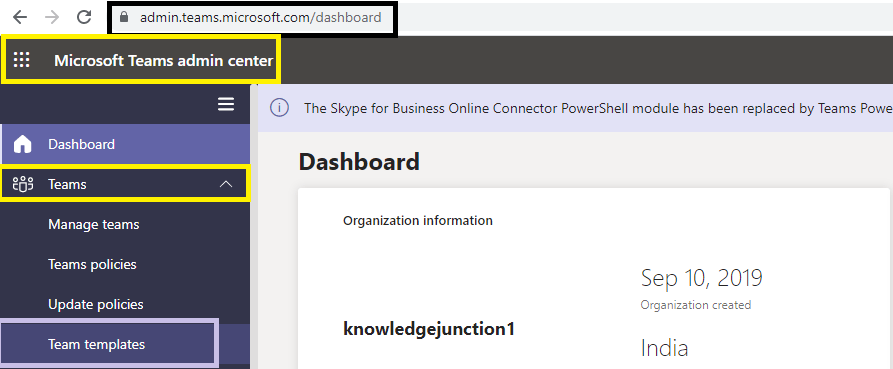
- When we click on “Team templates” we will be redirected to “templates” page as https://admin.teams.microsoft.com/teams/templates

- We could create our new custom template by clicking on “+ Add” link as shown in above fig
- When we click on “+ Add” link, we will be redirected add templates page as
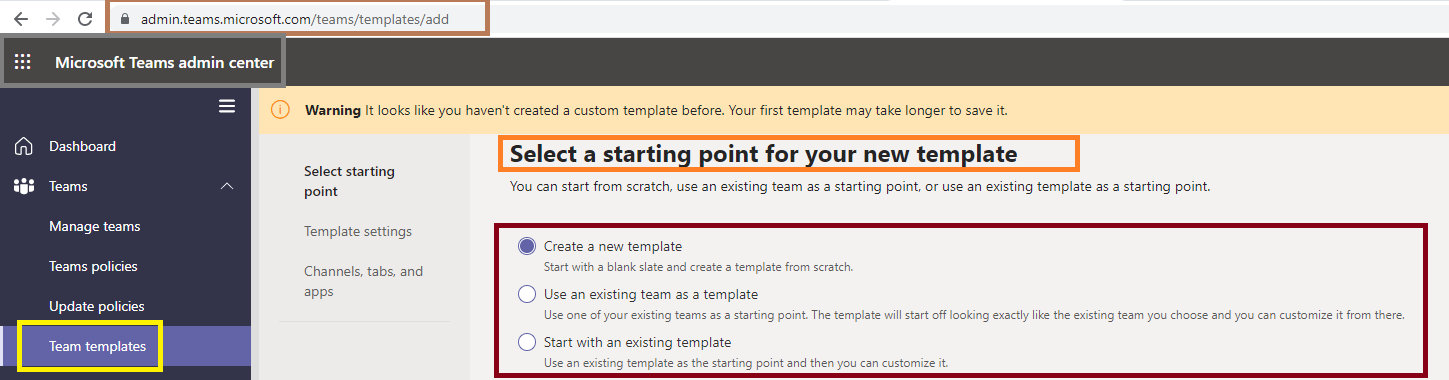
We will discuss more about teams creation in upcoming articles
Note : Currently Team templates dont support creation of private channels
We have very good series of Teams articles, please have a look once – https://knowledge-junction.in/category/technology-articles/m365/microsoft-teams/
Thanks for reading 🙂 If its worth at least reading once, kindly please like and share 🙂 SHARING IS CARING 🙂
Enjoy the beautiful life 🙂 Have a FUN 🙂 HAVE A SAFE LIFE 🙂 TAKE CARE 🙂


![PowerShell : resolving error - Method invocation failed because [System.Management.Automation.PSObject] does not contain a method named 'op_Addition'](https://i0.wp.com/knowledge-junction.in/wp-content/uploads/2024/06/fig1.png?fit=944%2C103&ssl=1&resize=40%2C40)

You must be logged in to post a comment.