Microsoft 365 : Executing SharePoint REST API using CURL

Microsoft 365 : Executing SharePoint rest API using CURL
Hi All,
Greetings for the day 🙂 LIFE IS BEAUTIFUL 🙂
Today new and interesting topic 🙂
Background: From one of the UNIX team I got the request that they want to get documents library from our SharePoint Online site. They need REST API for the same and that they can execute with CURL
What is CURL ?
- client URL
- Command line tool which we can use to transfer data to and from a server
- curl is compatible almost with every operating system
- curl is mostly used for testing endpoints (URLs) – if they works
- There are 100+ options for curl command, we can see those by executing following command in terminal
curl -h
- Example :
curl --request GET "https://knowledge-junction.in"Above command will return the HTML of site – “https://knowledge-junction.in”

Use case :
- Executing SharePoint online REST API using curl cmdlet required for getting SharePoint online data either in Python applications OR in UNIX / LINUX
Details :
- To execute SharePoint rest API using curl is two step process
- Get the Access Token using Client App and Client Secret key
- Access Token – Access Token is 64-bit encoded JSON Web Token (JWT)
- For more details on Access Token please have a look once our article – Office 365 – Microsoft Graph – Part 3 – Azure Access Token: to call Graph APIs from CSOM
- To get the access token we need to App ID and Client Secret key
- How to register / create new App and Client Secret please have a look once our article – Office 365 – Azure Active Directory – Registering/Creating new Azure App – detailed steps
- With the help Access Token, execute the actual query
- Get the Access Token using Client App and Client Secret key
- To get the Access Token we need to execute following command
curl --location --request GET 'https://accounts.accesscontrol.windows.net/<TENANT ID >/tokens/OAuth/2' \
--header 'Content-Type: application/x-www-form-urlencoded' \
--header 'Cookie: fpc=AgwffzYEgxtLpUSgaK75kv4q6277AQAAAGcuY9gOAAAA; esctx=AQABAAAAAAD--DLA3VO7QrddgJg7Wevr6kJk1jdY8CYOHieyeyXprdQAW5s7MCeNfXByCOLaCvuHDsPDhMqzwsg_I7eicEGle4-NkYOcidTMtbRe3xsdaQHRIDIPcVu64j5Df69m_Ayt608LA8qAkEjfD4OLJxeFP-jUfRKNJUmaI_1HaLABcEbC7QG3dsp2PBiATicmY6QgAA; x-ms-gateway-slice=estsfd; stsservicecookie=estsfd' \
--data-urlencode 'grant_type=client_credentials' \
--data-urlencode 'client_id=<CLIENT ID>@<TENANT ID>' \
--data-urlencode 'client_secret=<CLIENT SECRET>' \
--data-urlencode 'resource=00000003-0000-0ff1-ce00-000000000000/<DOMAIN NAME>@<TENANT ID>'- In the above command please fill your <TENANT ID>, <CLIENT ID> and <CLIENT SECRET>
- Here for demo purpose I’ll submit the details from local tenant – knowledgejunction1
- From the above command we will get an Access Token as
PS C:\> curl.exe --location --request GET 'https://accounts.accesscontrol.windows.net/6b38e1c3-a1fe-40cc-8b93-a4159a50592c/tokens/OAuth/2'\ --header 'Content-Type:application/x-www-form-urlencoded'\ --header 'Cookie:fpc=AgwffzYEgxtLpUSgaK75kv4q6277AQAAAGcuY9gOAAAA;esctx=AQABAAAAAAD--DLA3VO7QrddgJg7Wevr6kJk1jdY8CYOHieyeyXprdQAW5s7MCeNfXByCOLaCvuHDsPDhMqzwsg_I7eicEGle4-NkYOcidTMtbRe3xsdaQHRIDIPcVu64j5Df69m_Ayt608LA8qAkEjfD4OLJxeFP-jUfRKNJUmaI_1HaLABcEbC7QG3dsp2PBiATicmY6QgAA;x-ms-gateway-slice=estsfd;stsservicecookie=estsfd'\ --data-urlencode 'grant_type=client_credentials'\ --data-urlencode 'client_id=b72525db-885f-487c-a166-a7d13575af3b@6b38e1c3-a1fe-40cc-8b93-a4159a50592c'\ --data-urlencode 'client_secret=vkx7Q~i-hGyAfdl1EMp4UpM4TN13No5vghCmN'\ --data-urlencode 'resource=00000003-0000-0ff1-ce00-000000000000/knowledgejunction1.sharepoint.com@6b38e1c3-a1fe-40cc-8b93-a4159a50592c'\

{"token_type":"Bearer","expires_in":"86399","not_before":"1639209782","expires_on":"1639296482","resource":"00000003-0000-0ff1-ce00-000000000000/knowledgejunction1.sharepoint.com@6b38e1c3-a1fe-40cc-8b93-a4159a50592c","access_token":"eyJ0eXAiOiJKV1QiLCJhbGciOiJSUzI1NiIsIng1dCI6Imwzc1EtNTBjQ0g0eEJWWkxIVEd3blNSNzY4MCIsImtpZCI6Imwzc1EtNTBjQ0g0eEJWWkxIVEd3blNSNzY4MCJ9.eyJhdWQiOiIwMDAwMDAwMy0wMDAwLTBmZjEtY2UwMC0wMDAwMDAwMDAwMDAva25vd2xlZGdlanVuY3Rpb24xLnNoYXJlcG9pbnQuY29tQDZiMzhlMWMzLWExZmUtNDBjYy04YjkzLWE0MTU5YTUwNTkyYyIsImlzcyI6IjAwMDAwMDAxLTAwMDAtMDAwMC1jMDAwLTAwMDAwMDAwMDAwMEA2YjM4ZTFjMy1hMWZlLTQwY2MtOGI5My1hNDE1OWE1MDU5MmMiLCJpYXQiOjE2MzkyMDk3ODIsIm5iZiI6MTYzOTIwOTc4MiwiZXhwIjoxNjM5Mjk2NDgyLCJpZGVudGl0eXByb3ZpZGVyIjoiMDAwMDAwMDEtMDAwMC0wMDAwLWMwMDAtMDAwMDAwMDAwMDAwQDZiMzhlMWMzLWExZmUtNDBjYy04YjkzLWE0MTU5YTUwNTkyYyIsIm5hbWVpZCI6ImI3MjUyNWRiLTg4NWYtNDg3Yy1hMTY2LWE3ZDEzNTc1YWYzYkA2YjM4ZTFjMy1hMWZlLTQwY2MtOGI5My1hNDE1OWE1MDU5MmMiLCJvaWQiOiIyMmI1N2MwMi1mZWFhLTQ1NTktOWQ4OS0wNDdhMGI3NGE3M2YiLCJzdWIiOiIyMmI1N2MwMi1mZWFhLTQ1NTktOWQ4OS0wNDdhMGI3NGE3M2YiLCJ0cnVzdGVkZm9yZGVsZWdhdGlvbiI6ImZhbHNlIn0.WpG85H_3ZAuICV9VYwHWRJNg7KroU0IYzJInIxHtaKK1KaylLN2xAiIFPW5Fck_g0oquQkBC-869LZD9w4zuqvJ-ArODSgWPIPs0P0XuDMeRzEzl1eD2PwCAaWLeCcGNc1RiY0LZEBkJCBPoa0S4-Vqf9ppXMqgBd041-aqUtyqBxCJWV4ZNkKj021KhP1X5deMnMxOmxQuaNbVUVvV6TTmCOOD63X10csdTY3YOfsGc6HrpCX6RpMJu4obD47vuJKCn5sa2oXtWrA_78UQvAqIlfEzgBBGbwKssI7iTNlcMd46qAEgTIs3MvlAvM5dx42_nR5AaPY-atAgTyTvpVw"}
- Once we have Access Token – we could execute our respective REST API
- Here I’ll execute following REST API in my local tenant – https://knowledgejunction1.sharepoint.com/_api/web/GetFolderByServerRelativeUrl(‘Shared%20Documents’)/Files/
- Following is complete query using Access Token
curl --location --request GET "https://knowledgejunction1.sharepoint.com/_api/web/GetFolderByServerRelativeUrl('Shared%20Documents')/Files/" --header "Accept: application/json;odata=verbose" --header "Authorization: Bearer eyJ0eXAiOiJKV1QiLCJhbGciOiJSUzI1NiIsIng1dCI6Imwzc1EtNTBjQ0g0eEJWWkxIVEd3blNSNzY4MCIsImtpZCI6Imwzc1EtNTBjQ0g0eEJWWkxIVEd3blNSNzY4MCJ9.eyJhdWQiOiIwMDAwMDAwMy0wMDAwLTBmZjEtY2UwMC0wMDAwMDAwMDAwMDAva25vd2xlZGdlanVuY3Rpb24xLnNoYXJlcG9pbnQuY29tQDZiMzhlMWMzLWExZmUtNDBjYy04YjkzLWE0MTU5YTUwNTkyYyIsImlzcyI6IjAwMDAwMDAxLTAwMDAtMDAwMC1jMDAwLTAwMDAwMDAwMDAwMEA2YjM4ZTFjMy1hMWZlLTQwY2MtOGI5My1hNDE1OWE1MDU5MmMiLCJpYXQiOjE2MzkyMDk3ODIsIm5iZiI6MTYzOTIwOTc4MiwiZXhwIjoxNjM5Mjk2NDgyLCJpZGVudGl0eXByb3ZpZGVyIjoiMDAwMDAwMDEtMDAwMC0wMDAwLWMwMDAtMDAwMDAwMDAwMDAwQDZiMzhlMWMzLWExZmUtNDBjYy04YjkzLWE0MTU5YTUwNTkyYyIsIm5hbWVpZCI6ImI3MjUyNWRiLTg4NWYtNDg3Yy1hMTY2LWE3ZDEzNTc1YWYzYkA2YjM4ZTFjMy1hMWZlLTQwY2MtOGI5My1hNDE1OWE1MDU5MmMiLCJvaWQiOiIyMmI1N2MwMi1mZWFhLTQ1NTktOWQ4OS0wNDdhMGI3NGE3M2YiLCJzdWIiOiIyMmI1N2MwMi1mZWFhLTQ1NTktOWQ4OS0wNDdhMGI3NGE3M2YiLCJ0cnVzdGVkZm9yZGVsZWdhdGlvbiI6ImZhbHNlIn0.WpG85H_3ZAuICV9VYwHWRJNg7KroU0IYzJInIxHtaKK1KaylLN2xAiIFPW5Fck_g0oquQkBC-869LZD9w4zuqvJ-ArODSgWPIPs0P0XuDMeRzEzl1eD2PwCAaWLeCcGNc1RiY0LZEBkJCBPoa0S4-Vqf9ppXMqgBd041-aqUtyqBxCJWV4ZNkKj021KhP1X5deMnMxOmxQuaNbVUVvV6TTmCOOD63X10csdTY3YOfsGc6HrpCX6RpMJu4obD47vuJKCn5sa2oXtWrA_78UQvAqIlfEzgBBGbwKssI7iTNlcMd46qAEgTIs3MvlAvM5dx42_nR5AaPY-atAgTyTvpVw"- And output will be like
{"d":{"results":[{"__metadata":{"id":"https://knowledgejunction1.sharepoint.com/_api/Web/GetFileByServerRelativePath(decodedurl='/Shared Documents/SharePoint list items at November 20.csv')","uri":"https://knowledgejunction1.sharepoint.com/_api/Web/GetFileByServerRelativePath(decodedurl='/Shared%20Documents/SharePoint%20list%20items%20at%20November%2020.csv')","type":"SP.File"},"Author":{"__deferred":{"uri":"https://knowledgejunction1.sharepoint.com/_api/Web/GetFileByServerRelativePath(decodedurl='/Shared%20Documents/SharePoint%20list%20items%20at%20November%2020.csv')/Author"}},"CheckedOutByUser":{"__deferred":{"uri":"https://knowledgejunction1.sharepoint.com/_api/Web/GetFileByServerRelativePath(decodedurl='/Shared%20Documents/SharePoint%20list%20items%20at%20November%2020.csv')/CheckedOutByUser"}},"EffectiveInformationRightsManagementSettings":{"__deferred":{"uri":"https://knowledgejunction1.sharepoint.com/_api/Web/GetFileByServerRelativePath(decodedurl='/Shared%20Documents/SharePoint%20list%20items%20at%20November%2020.csv')/EffectiveInformationRightsManagementSettings"}},"InformationRightsManagementSettings":{"__deferred":{"uri":"https://knowledgejunction1.sharepoint.com/_api/Web/GetFileByServerRelativePath(decodedurl='/Shared%20Documents/SharePoint%20list%20items%20at%20November%2020.csv')/InformationRightsManagementSettings"}},"ListItemAllFields":{"__deferred":{"uri":"https://knowledgejunction1.sharepoint.com/_api/Web/GetFileByServerRelativePath(decodedurl='/Shared%20Documents/SharePoint%20list%20items%20at%20November%2020.csv')/ListItemAllFields"}},"LockedByUser":{"__deferred":{"uri":"https://knowledgejunction1.sharepoint.com/_api/Web/GetFileByServerRelativePath(decodedurl='/Shared%20Documents/SharePoint%20list%20items%20at%20November%2020.csv')/LockedByUser"}},"ModifiedBy":{"__deferred":{"uri":"https://knowledgejunction1.sharepoint.com/_api/Web/GetFileByServerRelativePath(decodedurl='/Shared%20Documents/SharePoint%20list%20items%20at%20November%2020.csv')/ModifiedBy"}},"Properties":{"__deferred":{"uri":"https://knowledgejunction1.sharepoint.com/_api/Web/GetFileByServerRelativePath(decodedurl='/Shared%20Documents/SharePoin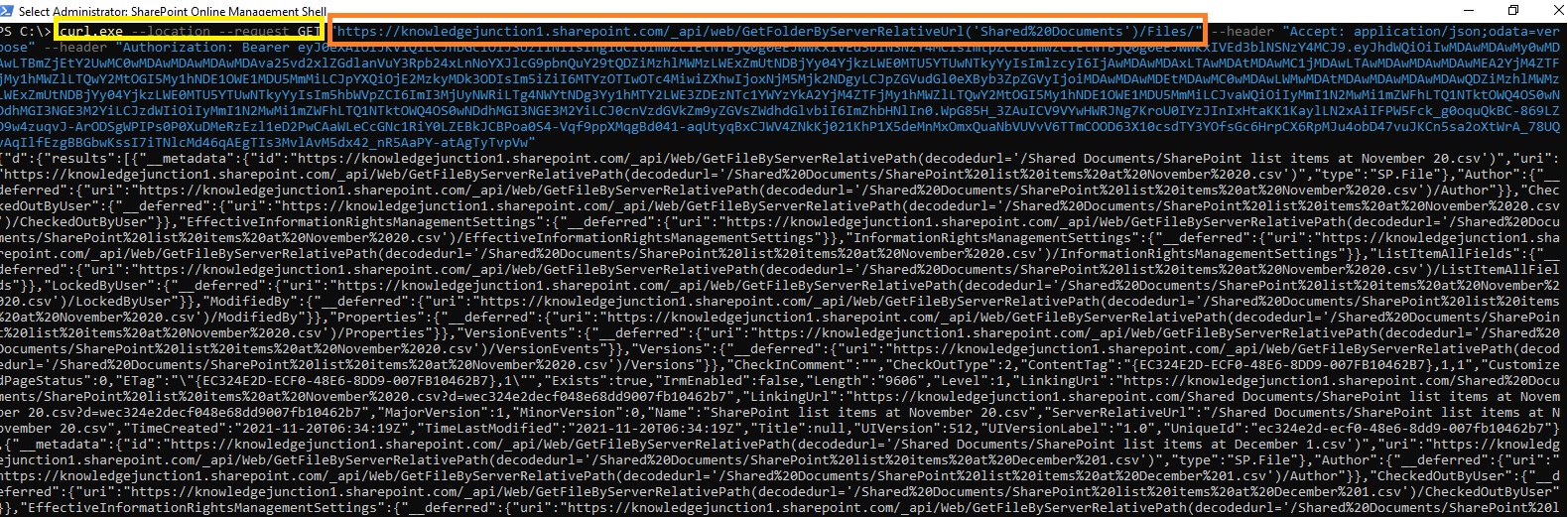
We have other good curl articles please have a look –
- curl – resolving error – curl : The remote name could not be resolved: ‘–help’ – https://knowledge-junction.in/2021/12/07/curl-resolving-error-curl-the-remote-name-could-not-be-resolved-help/
- Microsoft 365 – resolving error : curl: (1) Protocol “‘https” not supported or disabled in libcurl – https://knowledge-junction.in/2021/12/04/microsoft-365-resolving-error-curl-1-protocol-https-not-supported-or-disabled-in-libcurl/
Thanks for reading 🙂 Enjoy beautiful LIFE 🙂


You must be logged in to post a comment.