Microsoft 365 : SharePoint online – New Feature – News in Outlook

fig : Microsoft 365 - SharePoint online - new feature - News in Outlook - draft news

Hi All,

Greetings for the day!!! Today new feature update – related to SharePoint online

New Feature – Now it is possible to send news directly to reader email box or explicitly to specific peoples / users / readers

Details

  • New integration of SharePoint News into Outlook
  • News authors can preview and send full news posts as emails to reader’s inbox.
  • To help authors get started, new six templates are added in Outlook and SharePoint.
  • With unified page analytics, authors will be able to see their total page reads across outlook and SharePoint as one number

Demo

  • Let’s demonstrate this with creating one news post and emailing
  • I am opening here my sharepoint demo site
  • Create new News post – as in below fig expand the “+ New ” from command bar

fig : Microsoft 365 - SharePoint online - new feature - News in Outlook - Creating new "News post"
fig : Microsoft 365 – SharePoint online – new feature – News in Outlook – Creating new “News post”

  • As we click on “News post” option we will have “News templates” options to select as in below fig
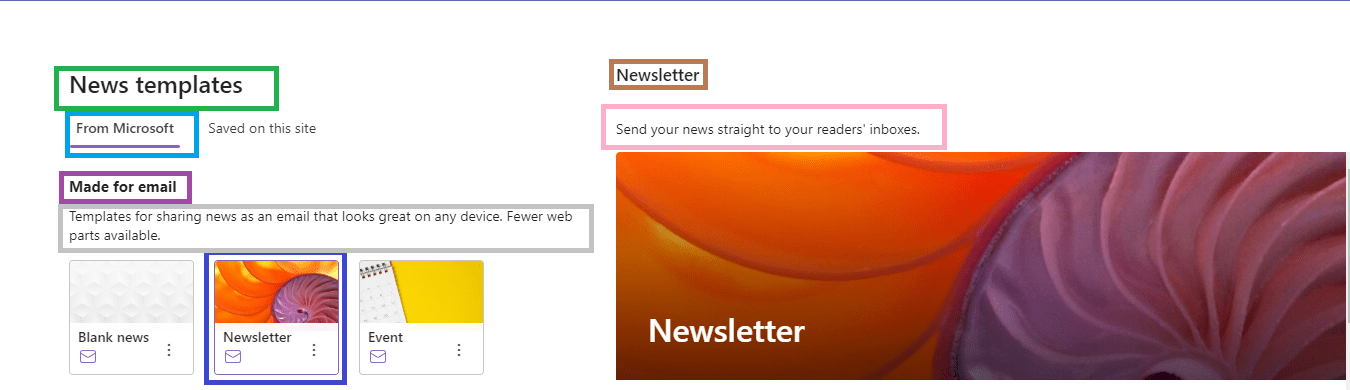
fig : Microsoft 365 - SharePoint online - new feature - News in Outlook - creating new News - "News templates" dialog
fig : Microsoft 365 – SharePoint online – new feature – News in Outlook – creating new News – “News templates” dialog

  • Select the “Newsletter” template from the templates under “From Microsoft” templates
  • As we select the template, we will draft news post as in below fig
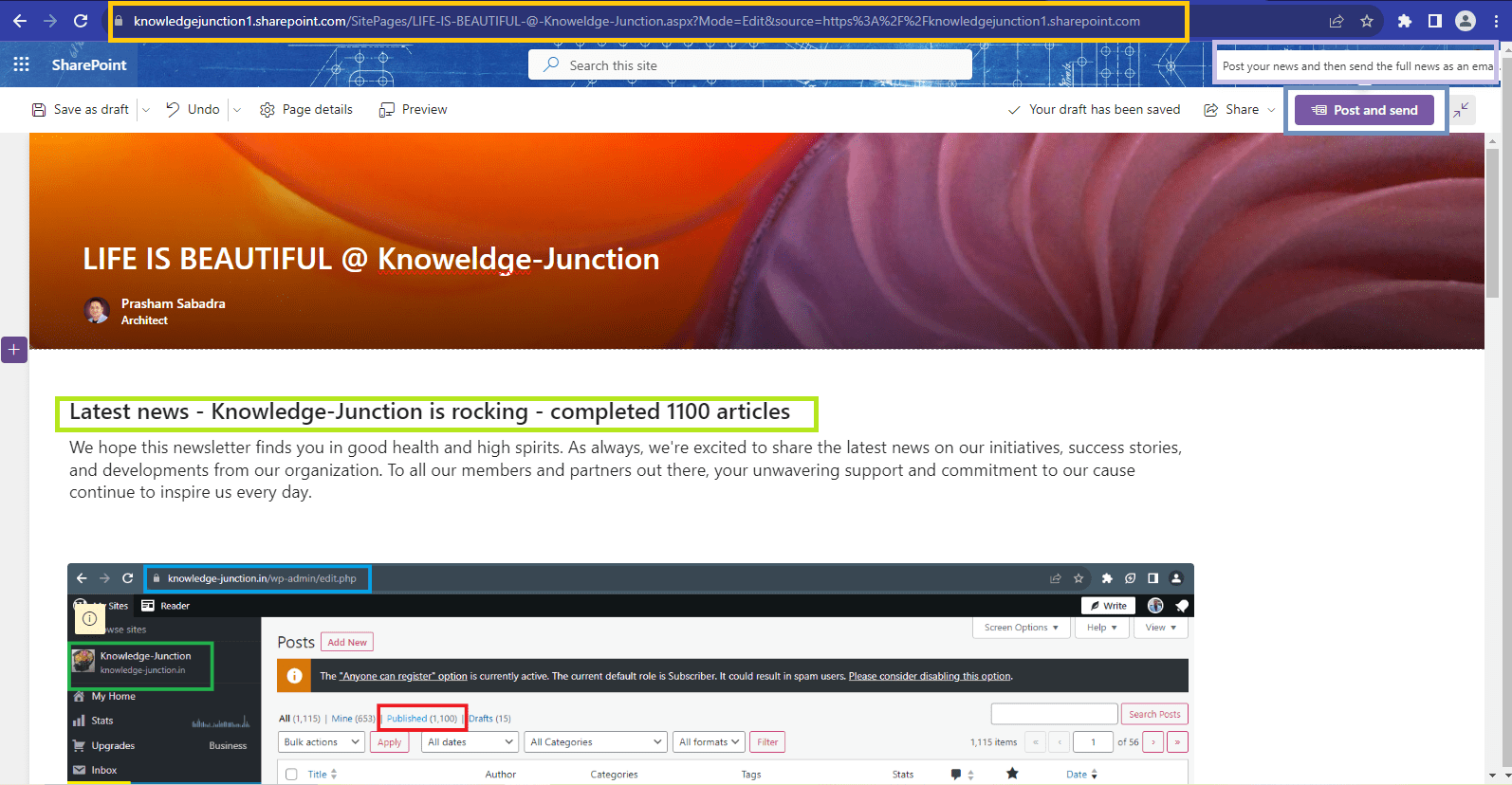
fig : Microsoft 365 - SharePoint online - new feature - News in Outlook - draft news
fig : Microsoft 365 – SharePoint online – new feature – News in Outlook – draft news
  • Specify all the news details
  • Once all news details are specified – from top right corner please click on “Post and send” button as in above fig
  • As we click on “Post and send” button we will have “Send this news post as an email” as shown in below fig
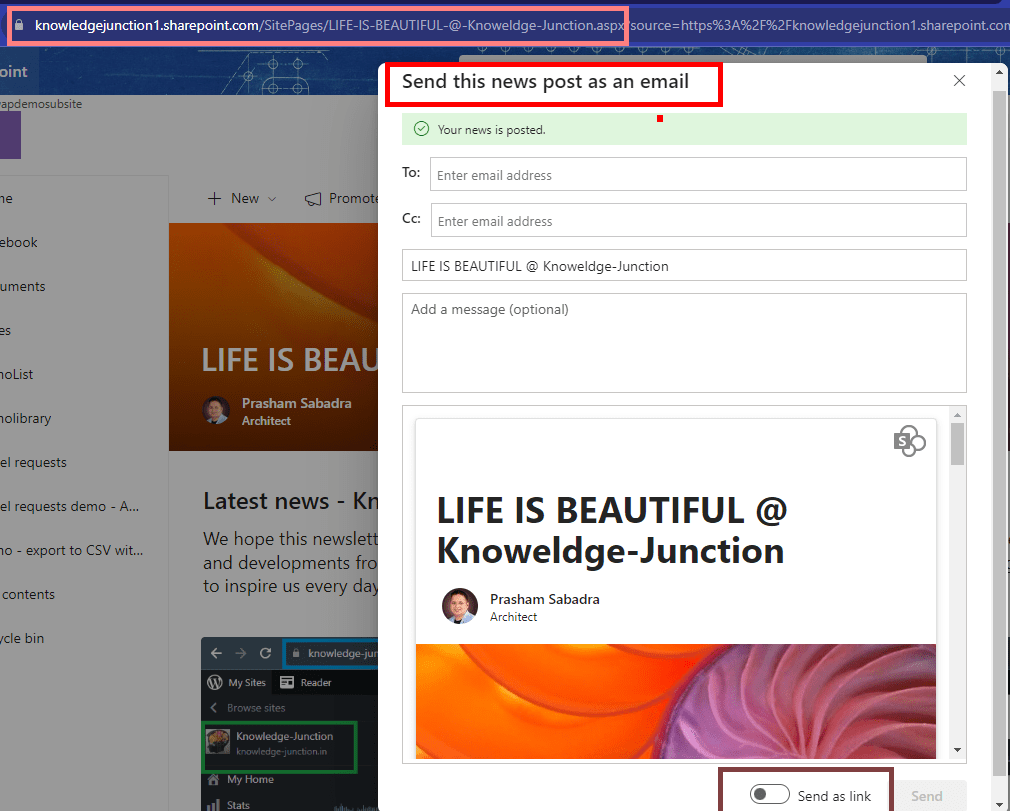
fig : Microsoft 365 - SharePoint online - new feature - News in Outlook - "Send this news post as an email" dialog
fig : Microsoft 365 – SharePoint online – new feature – News in Outlook – “Send this news post as an email” dialog

  • In “Send this news post as an email” specify the respective details like – To address, Cc if available, Subject, Message
  • After specifying all the details just click on “Send” button at bottom right corner as shown in below fig

fig : Microsoft 365 - SharePoint online - new feature - News in Outlook - "Send this news post as an email" dialog
fig : Microsoft 365 – SharePoint online – new feature – News in Outlook – “Send this news post as an email” dialog

  • On successful mail sent we will get notification as in below snap

fig : Microsoft 365 - SharePoint online - new feature - News in Outlook - Successful email sent
fig : Microsoft 365 – SharePoint online – new feature – News in Outlook – Successful email sent

  • Let’s check outlook

fig : Microsoft 365 - SharePoint online - new feature - News in Outlook
fig : Microsoft 365 – SharePoint online – new feature – News in Outlook

When this will happen in standard release

  • Standard Release. Rollout will begin in mid-September 2023 and is expected to be complete by late September 2023.

Microsoft 365 Roadmap ID124803SharePoint: News in Outlook

Microsoft 365 Roadmap ID - 124803 - SharePoint: News in Outlook
Microsoft 365 Roadmap ID – 124803SharePoint: News in Outlook

Thanks for reading! If you think this is useful, kindly please like and share! HAVE a FANTASTIC LEARNING ! LIFE IS BEAUTIFUL 🙂

Prasham Sabadra

LIFE IS VERY BEAUTIFUL. ENJOY THE WHOLE JOURNEY :) Founder of Microsoft 365 Junction, Speaker, Author, Learner, Developer, Passionate Techie. Certified Professional Workshop Facilitator / Public Speaker. Believe in knowledge sharing. Around 20+ years of total IT experience and 17+ years of experience in SharePoint and Microsoft 365 services Please feel free me to contact for any SharePoint / Microsoft 365 queries. I am also very much interested in behavioral (life changing) sessions like motivational speeches, Success, Goal Setting, About Life, How to live Life etc. My book - Microsoft 365 Power Shell hand book for Administrators and Beginners and 100 Power Shell Interview Questions - https://www.amazon.in/Microsoft-Administrators-Beginners-Interview-Questions/dp/9394901639/ref=tmm_pap_swatch_0?_encoding=UTF8&qid=1679029081&sr=8-11

You may also like...

Leave a Reply

This site uses Akismet to reduce spam. Learn how your comment data is processed.

Discover more from Microsoft 365

Subscribe now to keep reading and get access to the full archive.

Continue reading