Microsoft 365 – Power Platform – Empowering your Learning Journey: A Comprehensive Guide to Power Platform for Beginners – Choosing the Right Data Storage: Navigating Between SharePoint Lists and Dataverse – Part 13

“It always seems impossible until it’s done.”
Welcome to a captivating expedition into the realms of Dataverse and SharePoint Lists – the dynamic duo in the world of data management and application development. In this comprehensive guide, we extend a warm greeting to all eager learners and enthusiasts ready to delve into the intricacies of these powerful tools.
Together, we’ll unlock the full potential of Dataverse and SharePoint Lists, reshaping the way you handle information, build apps, and fortify the security of your invaluable data. So, buckle up for an enlightening journey where knowledge meets practical application, and the power to transform your digital landscape awaits!
Empower your learning journey with Power Apps!
- Foundations: Master Power Apps and the Power Platform dynamics. Read Part 1.
- Exploration: Navigate Power Apps’ enchanting features. Explore Part 2.
- No Code Magic: Unleash creativity with Canvas Apps. Discover Part 3.
- Business Decisions: SPFx vs Power Apps insights. Decide with Part 4.
- Hands-On Creation: Team-guided Canvas App creation. Create with Part 5.
- App Mobility: Learn Power Apps basics – Moving Your Apps Around. Explore Part 6.
- Navigating Environments: A Beginner’s Guide. Dive into Part 7.
- Creating and Managing Environments: Part 8 – A Comprehensive Guide for Beginners. Read Part 8 Here
- Let’s Explore Power Platform Admin Center: A Beginner’s Adventure – Part 9. For the detailed guide, Read Part 9 Here.
- Empower your learning journey with the latest insights in Part 10 – Unleashing the Power of Managed Environments in Power Platform! Read Part 10 Here.
- Powering Up Your Apps: A Guide to Avoiding Common Mistakes and Crafting a Seamless Power Platform Experience. Discover Part 11 Here!
- Unleashing the Power of Model-Driven Apps: Key Insights – Part 12. Explore the dynamic world of Model-Driven Apps and elevate your Power Platform proficiency. Read Part 12 Here!
Key Takeaways from this article
In this article:
- Dataverse’s role as a smart digital filing system.
- SharePoint Lists as versatile digital to-do lists.
- Application development strategies, considering complexity.
- Navigating security challenges and leveraging advantages.
- Cost, complexity, and scalability considerations.
- Decision-making criteria based on organization size and growth expectations.
Embark with us on this journey to master the intricacies of Dataverse and SharePoint Lists.
Dataverse:
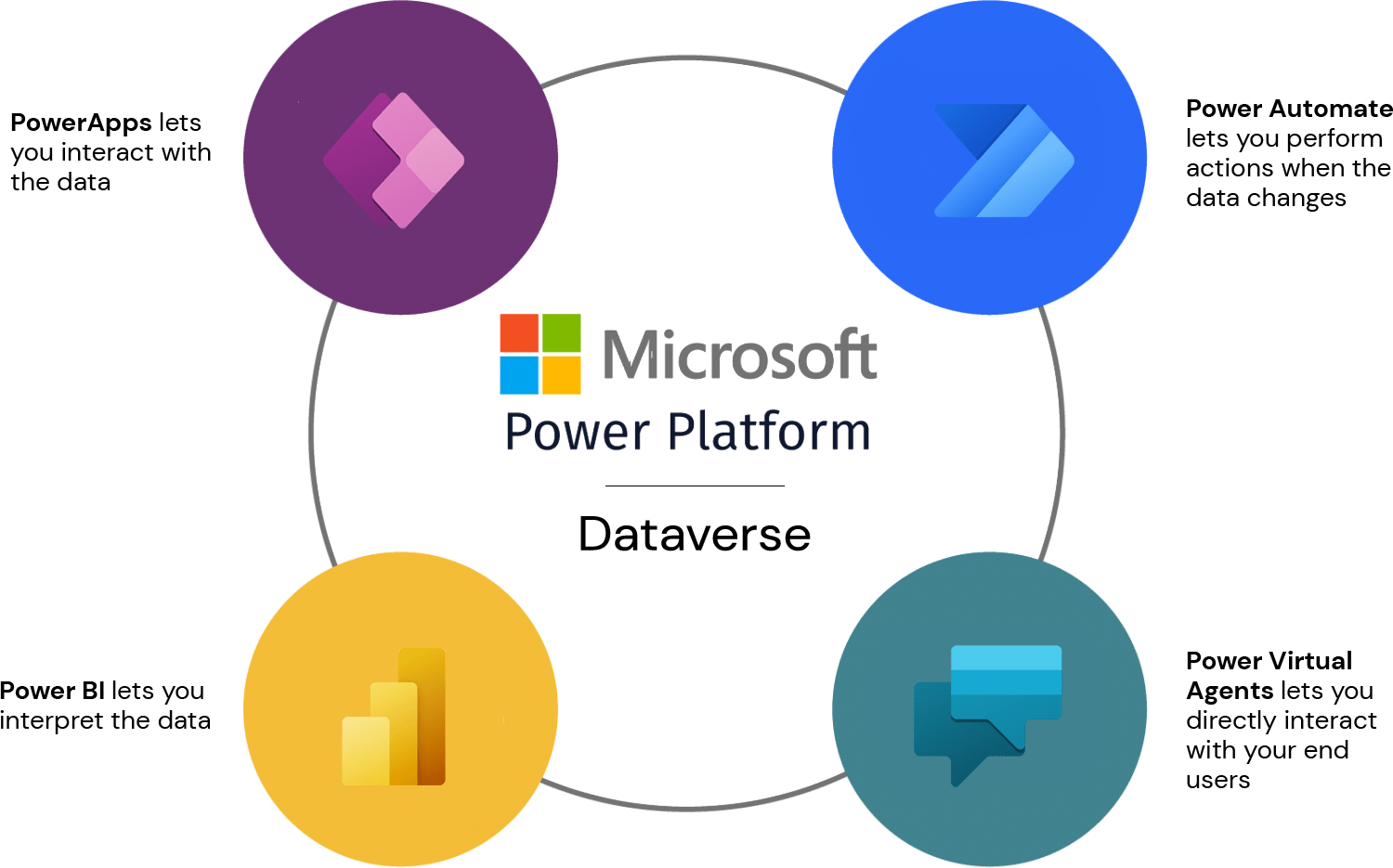
- High-Tech Database: We’ve got Dataverse, and it’s like our super-smart digital filing system. It’s like a supercharged Excel sheet where we can store and organize information in a very fancy way.
- Relationship Magic: We’re excellent at connecting different pieces of information. Think of it like linking our list of friends with a list of gifts they like – so we always know what to get them for birthdays.
- Create Super Apps: We can build really cool computer programs (we call them apps) using Dataverse. These apps can do complex things, like tracking inventory, managing projects, or handling customer info.
- Tailored to You: We can make our own special tables to store information in a way that makes sense for our business. It’s like having a filing system that fits our needs perfectly.
- Handles a Lot: Because we’re like a super-smart digital filing cabinet, we can handle a ton of information without getting messy. Great for us if we’re a big business with lots of data.
- Keeps Secrets Well: Our security is top-notch. We make sure only the right people can see and change things. This is important for keeping our business information safe.
SharePoint Lists:

- Digital To-Do Lists: Think of SharePoint Lists as our digital versions of everyday lists – like a to-do list or a list of contacts.
- Basic Friendships Between Lists: We can connect one list to another, but it’s not as fancy as Dataverse. It’s more like saying, “Hey, this list knows about that list a bit.”
- Buddy of SharePoint: If we’re already using SharePoint for teamwork and sharing files, Lists are like our friendly sidekick. They fit right in and help us keep track of things.
- Good for Simple Jobs: Lists are great for our simple needs. If we just need to keep track of tasks or names and don’t want anything too complicated, Lists are like having a reliable, straightforward tool.
- Doesn’t Cost a Fortune: It’s usually cheaper than Dataverse. If we don’t need all the super-smart features and just want something that works well, Lists are a budget-friendly choice.
Choosing Between the Two:
- Dataverse is like having a superhero database for us if we’re a big business with complex needs and a bigger budget.
- SharePoint Lists are like our everyday, reliable tool for simpler needs, especially if we’re already using SharePoint for other things.
Data:
- How much and what types of data does our application need?
- Dataverse: We’re talking big databases with lots of connected information.
- SharePointLists: Good for simpler lists, like names or tasks, not super connected.
- How do we want to search the data?
- Dataverse: It’s like having a super search engine, great for complex searches.
- SharePointLists: Good for basic searches but not as fancy as Dataverse.
Application:
- How is the app going to be made available? Is it a Teams app, custom code, or something else?
- Dataverse: If we’re using Microsoft’s apps and tools a lot, Dataverse fits right in.
- SharePointLists: If we’re more into custom coding, SharePoint Lists are like our digital canvas.
- Will people outside our organisation be using the app?
- Dataverse: Costs might go up if outsiders use it, so check our budget.
- SharePointLists: More flexible for external users without extra costs.
- Who is responsible for building the app?
- Dataverse: Easy for non-experts, great for everyday workers to build stuff.
- SharePoint Lists: If our team knows SharePoint, they’ll find Lists familiar.
- Will the app need special capabilities?
- Dataverse: If our app needs to do really special things, Dataverse is like having a superhero toolkit.
- SharePointLists: Good for simpler needs, not the superhero toolkit.
Integration:
- What do we want to integrate the system with? For example, databases, services, etc.
- Dataverse: Talks smoothly with other Microsoft tools and databases.
- SharePointLists: Best buddies with other SharePoint things.
Admin and Governance:
- Do we have existing rules in place in our organisation for security and compliance?
- Dataverse: Super secure, follows the big rules for keeping data safe.
- SharePointLists: Secure, but check if it fits with our SharePoint rules.
- How would we backup and restore any data?
- Dataverse: Built-in backups make it easy.
- SharePointLists: Check if our usual SharePoint backup tricks work here.
Overall Considerations:
- Cost: Dataverse: Might be pricier because it’s a fancy toolkit. SharePoint Lists: More budget-friendly for simpler needs.
- Complexity: Dataverse: If we’re doing something really complex, Dataverse is our tool. SharePoint Lists: Simpler and straightforward.
- Team Skills: Dataverse: Easy for everyday workers. SharePoint Lists: Good if our team knows SharePoint well.
Volume of Data:
SharePoint Lists for Smaller, Simpler Lists:
- Ideal for Small to Medium-Sized Data: We consider SharePoint Lists like our trusty notebook. It’s great for keeping lists of things—names, tasks, you name it. Perfect for smaller amounts of data, up to around one hundred thousand rows.
- Budget-Friendly: Since many of us get SharePoint Online with our Microsoft 365 subscription, using SharePoint Lists usually won’t cost extra. It’s like having a tool in our toolbox without paying extra for it.
- Widely Used and Familiar: Many organizations use SharePoint Lists because it’s like a comfortable pair of shoes. It’s part of Microsoft 365, so we often already have it. Familiarity makes it an easy choice.
- Stored on SharePoint Sites: Lists live in SharePoint sites, making it a cozy home for our data if we’re already using SharePoint a lot. However, when our data grows, we might need to be a bit careful with how we organize things.
Dataverse for Larger Volumes of Data:

- Built for Handling Big Data: Dataverse is like our superhero platform for data. It’s designed to handle large amounts of information. If we’re thinking big, Dataverse is our go-to.
- Works Hand-in-Hand with Power Platform: Imagine Dataverse as the engine of a powerful car. It works seamlessly with the Power Platform, letting us build super cool apps and do fancy things with our data.
- Fancy Data Relationships: If our data is like a web, with lots of connections and relationships, Dataverse is the master weaver. It’s a relational database, which means it’s great at keeping everything neatly connected.
- Scalability Over Time: Dataverse is like a growing tree. As our data needs get bigger, Dataverse can handle it. It’s a long-term solution for organizations that plan to expand and need a strong foundation.
Choosing Based on Data Size:
- SharePoint Lists: Think of it as our trusty notebook for simpler needs. It’s great if our data is cozy and fits into the notebook. Good for smaller to medium-sized data and friendly on the budget.
- Dataverse: This is our superhero when we’re thinking big. It’s like having a powerful engine for our data, perfect for larger volumes and complex relationships. If we’re planning for growth, Dataverse is the way to go.
Security Challenges with SharePoint Lists:

- Unique Permissions Complexity:
- In Simple Terms: If we start giving different things different secret codes (permissions), it gets confusing quickly. Managing lots of secret codes for each item is tough.
- Power App and Flow Permission Setup:
- In Simple Terms: When we try to control who sees what in our apps, it’s not always easy. Setting up who can access what can be a bit of a puzzle, especially in Power Apps or flows.
- URL Access Risks:
- In Simple Terms: Imagine each piece of info has a web address. If someone gets hold of the address for one piece, they might find their way to other pieces. It’s like having a secret path to all our data.
Advantages of Dataverse in Security:

- Fewer Limitations:
- In Simple Terms: With Dataverse, we have more control. It’s like having a magic wand to manage who sees what, and it’s not as tricky as with SharePoint Lists.
- No URL-Based Access:
- In Simple Terms: Dataverse doesn’t use web addresses to show data. So, even if someone knows the web address for one piece of info, they can’t use it to find others. It’s like having separate secret rooms for each piece of data.
- Centralized Security Model:
- In Simple Terms: Dataverse keeps all our security rules in one place. It’s like having a boss that manages who gets access to what, making it simpler for us to control who sees our stuff.
Security Considerations:
- Complexity vs. Control:
- SharePoint is flexible but a bit tricky to control. Dataverse gives us more control without the tricky bits, like having a remote control that’s easy to use.
- Data Isolation:
- SharePoint’s web addresses can lead anywhere. Dataverse keeps each piece of data in its own secret bubble. It’s like having separate lockers for each piece of info.
- Use Case Considerations:
- If our data is not super secret and we need flexibility, SharePoint is like an easy tool. For serious secret stuff, Dataverse is like a superhero shield for our data.
Costs Involved:

SharePoint Lists:
- No Extra Costs for Access: Using SharePoint Lists from apps or flows doesn’t cost anything extra. It’s like having a tool in our toolbox, and we don’t pay extra each time we use it.
- Great Starting Point: Many people like SharePoint Lists because they come with Microsoft 365. It’s a bit like getting a freebie with our subscription, making it a good starting point, especially if we’re just getting the hang of things.
Dataverse:
- Part of Power Apps Subscription: Dataverse comes as part of a Power Apps subscription. It’s like getting a package deal; we can’t order Dataverse separately.
- Premium Connector with Licensing: Think of Dataverse like a special tool that requires a license to use. If we have any Power App or Power Automate license (like Per app or Per user plans), it includes access to Dataverse.
Choosing Between the Two:
- Small Organizations Starting Out:
- SharePoint Lists: If we’re a small team and just starting with Power Apps, SharePoint Lists are like our beginner’s toolkit. They’re easy, and we don’t need to worry about extra costs.
- Bigger Projects and Scalability:
- Dataverse: For bigger projects or if we expect to handle a lot more data, Dataverse is like the advanced toolkit. It’s a bit fancier and built for bigger things.
Considerations for Decision-Making:
- Organization Size:
- Small Organizations: If we’re a small group, SharePoint Lists are like our friendly sidekick. They’re simple and good for small tasks.
- Bigger Projects: For larger projects with more complexity, Dataverse is like our superhero suit. It’s designed for bigger challenges.
- Data Growth Expectations:
- Limited Data Growth: SharePoint Lists are good if we don’t expect our data to explode. They’re like a small car that gets us where we need to go.
- Anticipated Data Expansion: Dataverse is for those who see their data growing a lot. It’s like having a big truck for all our data needs.
- Connect with Experts:
- Expert Advice: If we’re not sure, talking to experts is like having a wise friend. They can guide us in picking the right tools and help us understand what’s best for our unique needs.
In a nutshell, SharePoint Lists are like our trusty starting tools, especially for smaller teams. Dataverse is for those planning bigger things, with fancier features and scalability in mind. The key is to pick the tools that fit our size and the challenges we’re ready to tackle.
Conclusion
Dataverse and SharePoint Lists offer a powerful duo for data management and application development. We recommend Dataverse for larger projects and scalability, while SharePoint Lists excel in simplicity for smaller tasks. Tailor our choice to our organization’s size and ambitions. This guide empowers us to navigate the intricacies of these tools, unlocking transformative potential in our digital landscape.
Also get my article updates on my social media handles.
Twitter – https://twitter.com/PrajyotYawalkar?t=oovP0r9FnDtz5nNSJGKO0Q&s=09
LinkedIn – https://www.linkedin.com/in/prajyot-yawalkar-093716224/
Have a wonderful day.
Thanks for reading.


![PowerShell : resolving error - Method invocation failed because [System.Management.Automation.PSObject] does not contain a method named 'op_Addition'](https://i0.wp.com/knowledge-junction.in/wp-content/uploads/2024/06/fig1.png?fit=944%2C103&ssl=1&resize=40%2C40)


1 Response
[…] Choosing the Right Data Storage: Navigating Between SharePoint Lists and Dataverse – Part 13. Dive into the intricacies of data storage options and make informed choices for your Power Platform projects. Read Part 13 Here! […]