Microsoft 365 – Power Platform – Power Apps – Empowering your Learning Journey: A Comprehensive Guide to Power Apps for Beginners – Powering Up Your Apps: A Guide to Avoiding Common Mistakes and Crafting a Seamless Power Platform Experience – Part 11

“Successful people are not gifted; they just work hard, then succeed on purpose.”

Hey there, Power Platform explorers! Starting our journey with Power Platform is like opening a door to a world full of exciting app-making and task-automating adventures. But, let’s be real – figuring out the setup can be a bit tricky, especially if we’re just getting started. Don’t worry! In this guide, we’ll chat about common mistakes we might encounter and share easy solutions to make our journey a breeze. So, get ready to dive into the world of Power Platform magic!
Empower your learning journey with Power Apps!
- Foundations: Master Power Apps and the Power Platform dynamics. Read Part 1.
- Exploration: Navigate Power Apps’ enchanting features. Explore Part 2.
- No Code Magic: Unleash creativity with Canvas Apps. Discover Part 3.
- Business Decisions: SPFx vs Power Apps insights. Decide with Part 4.
- Hands-On Creation: Team-guided Canvas App creation. Create with Part 5.
- App Mobility: Learn Power Apps basics – Moving Your Apps Around. Explore Part 6.
- Navigating Environments: A Beginner’s Guide. Dive into Part 7.
- Creating and Managing Environments: Part 8 – A Comprehensive Guide for Beginners. Read Part 8 Here
- Let’s Explore Power Platform Admin Center: A Beginner’s Adventure – Part 9. For the detailed guide, Read Part 9 Here.
- Empower your learning journey with the latest insights in Part 10 – Unleashing the Power of Managed Environments in Power Platform! Read Part 10 Here.
Key Takeaways from this article
- Picking the Wrong Neighborhood for Your App: Understand the importance of selecting the right region for optimal performance and data privacy.
- Choosing the Wrong Environment Setting: Avoid the mistake of using the default “Sandbox” for important work; switch to a “Production” environment for reliability.
- Forgetting Your App’s Digital Address: Explore the significance of setting and updating your app’s URL to ensure seamless accessibility.
- Securing Your App with Digital Bouncers: Learn the necessity of applying security groups to control access and prevent unauthorized changes.
- Role Assignments: Casting Characters for Your App: Recognize the importance of assigning specific roles to users, just like roles in a movie, for a well-functioning app.
- Data Policies: Keeping Your App’s Data on a Leash: Understand the need for data policies to control connector usage and prevent data leaks to third-party services.
- Organized App Lifecycle: Plan and use solutions for systematic app development, avoiding chaos and ensuring a smooth journey.
- Prompt Licensing for Premium Features: Emphasize the importance of timely application of Power Platform licenses to unlock premium app features without delays.
Choosing the Right Place for Our App

Mistake: Imagine picking a neighborhood for our app without the chance to move. If we select the wrong region initially, there’s no way to correct it. Our only option is to create a new environment from scratch.
Solution: Be careful when choosing the region for our app, as it determines the datacenter where our Power Apps, Power Automate flows, and data reside. Opt for a datacenter close to our users for optimal performance. Additionally, consider data sovereignty – storing data outside our home country means it’s subject to the laws of that location. This decision is crucial and cannot be reversed once made, so choose wisely from the start.

Example: If our friends are in the USA, let’s make sure our app’s home is there too. It’ll run faster, and everyone’s privacy is safe.
Avoiding the Sandbox Trap
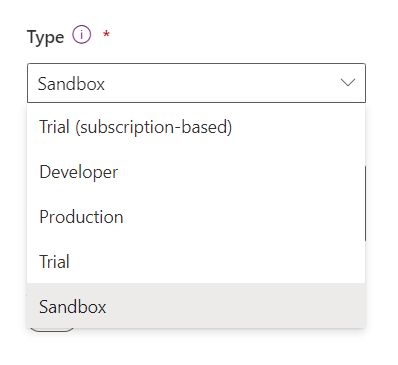
Mistake: Using the default “Sandbox” for serious work is like playing with toys when we need to build a real castle. It’s fun, but we can lose all our hard work.

Solution: If we accidentally set up a Sandbox for important stuff, let’s switch it to a “Production” setup using the Power Platform Admin Center.

Example: Imagine we’re building a treehouse, and suddenly all our treehouse plans disappear. That’s why we use a “Production” setup for important stuff.
Don’t Forget Our App’s Web Address

Mistake: Forgetting our app’s web address is like moving to a new house without telling anyone. Our app might get lost in the digital world.

Solution: Set up our app’s URL in the Power Platform Admin Center carefully to avoid disruptions. If, for any reason, we need to update the web address after the environment is created, head to the Power Platform Admin Center and smoothly make the necessary changes in the environment settings.

Example: Think of our app’s URL as its street address. If we ever move (update the address), we can easily do it through the Power Platform Admin Center, ensuring our app continues to be easily accessible and doesn’t get lost in the vast digital neighborhood.
Protecting Our App with Security Guards

Mistake: Leaving our app’s door wide open without security guards is risky. Anyone can come in, and important stuff might leak.

Solution: Use the Power Platform Admin Center to set up security groups. They’re like bouncers, making sure only the right people can make changes. If there’s ever a need to update or modify security groups, we can easily do so by navigating to the Power Platform Admin Center and editing the environment settings.

Example: Think of security groups as the cool bouncers at a party. If we need to adjust the guest list or make sure only specific individuals have access, we can smoothly handle it through the Power Platform Admin Center, ensuring our app’s security is always top-notch.
Assigning Roles Like in a Movie

Mistake: Imagine a movie where everyone is on the stage, but no one knows their role. Chaos, right? Similarly, assuming that users listed in the environment automatically have the required security roles can lead to functionality issues.

Solution: In our Power Platform movie, every actor needs a specific role to play. To assign these roles, head to the Users menu in the Power Platform Admin Center. Select the user you want to assign a role to and then smoothly click on “Manage Security Roles.”
Example: Think of our app as a blockbuster movie. Not everyone can be the hero; some are supporting actors or even the villains. So, when we want to give a user a specific role, we go to the Users menu, pick the actor (user), and then decide which character (role) they should play by clicking “Manage Security Roles.” This ensures everyone knows their part, and our app runs like a well-scripted movie.
Keeping Our Data on a Leash

Mistake: Imagine letting our app’s data roam freely, like a pet without a leash. It might end up where it shouldn’t, and that’s a risk. By default, all connectors can be used with no limitations, allowing our organization’s private data to potentially be sent to third-party online services and consumed by their APIs.

Solution: Data policies act like a leash, defining which connectors are enabled or blocked and which can be used together. If we’re unsure about the proper data policy during environment creation, a smart move is to categorize Microsoft connectors as business and others as non-business. This ensures Microsoft connectors don’t interact with third-party APIs. Also, consider blocking the HTTP connector until a good reason arises to enable it, as it can access any API on the internet.
Example: Think of data policies as the rules for our app’s pet (data). By categorizing connectors, we’re putting our pet on a leash, preventing it from wandering into areas it shouldn’t. And just like a responsible pet owner, if we decide to change the rules (data policy) after our app and flows are already developed, we can use tools like the Power Platform Center Of Excellence Starter Kit’s DLP Editor. This acts like a friendly neighborhood watch, allowing us to run an impact analysis before making changes. If anything might break, we can inform the creators, find a resolution, and keep our data safely on its leash.
Guiding Our App Through Life: A Simple Approach

Mistake: Imagine playing a game with no rules – it would be confusing and messy. Running our app without a plan is like that; things can get all jumbled up.

Solution: To keep our app on the right track, we need a plan. Think of solutions as the rules for our app’s journey. They help us pack and move changes in an organized way, like following a roadmap. This way, we avoid confusion and errors as we develop, test, and launch our app.
Example: Picture our app’s development like writing a story. Without a plan, the story might not make sense, with characters and events all over the place. Solutions act as our story outline, making sure each part of the app’s journey fits together nicely. With a clear plan, we can introduce updates smoothly, like writing chapters one by one. This keeps our app’s “life” neat and engaging, just like a well-told story that captivates its readers.
Getting VIP Passes for Our App

Mistake: Forgetting to grab VIP passes for our app is like arriving at a concert without a ticket. Without Power Platform licensing, developers and end-users can’t fully enjoy premium apps, flows, and other services.

Solution: VIP passes, in this case, are the licenses – per app, per flow, AI Builder credits, and Power Pages capacity. To get these passes, we need to head to the Capacity menu in our environment and add them as necessary add-ons. Importantly, per user licenses are like golden tickets assigned to a user account, and they don’t need to be assigned to each new environment created.
Example: Think of licenses as the tickets that grant access to the exclusive backstage of a concert. If we forget to get our VIP passes (licenses), we might miss out on the premium features of our app. Just like how each person (user) has their own concert ticket (per user license), ensuring they can enjoy the show (use the app) without any hiccups.
Conclusion
So, we’ve reached the end of our Power Platform journey! It’s been quite a ride, learning how to set up our apps the right way. We picked the best “neighborhood” for our app, made sure it’s safe and secure, and guided it through development smoothly.Remembering our app’s address, setting up security, and keeping our data in check were crucial steps. Assigning roles, having a clear plan, and getting VIP passes (licenses) made our journey even smoother.In a nutshell, we’ve made smart choices to avoid common mistakes. Our apps are now ready to shine! Cheers to more success and fun on our Power Platform adventure. Happy building!
Also get my article updates on my social media handles.
Twitter – https://twitter.com/PrajyotYawalkar?t=oovP0r9FnDtz5nNSJGKO0Q&s=09
LinkedIn – https://www.linkedin.com/in/prajyot-yawalkar-093716224/
Have a wonderful day.
Thanks for reading.


4 Responses
[…] Powering Up Your Apps: A Guide to Avoiding Common Mistakes and Crafting a Seamless Power Platform Experience. Discover Part 11 Here! […]
[…] Powering Up Your Apps: A Guide to Avoiding Common Mistakes and Crafting a Seamless Power Platform Experience. Discover Part 11 Here! […]
[…] Powering Up Your Apps: A Guide to Avoiding Common Mistakes and Crafting a Seamless Power Platform Experience. Discover Part 11 Here! […]
[…] Powering Up Your Apps: A Guide to Avoiding Common Mistakes and Crafting a Seamless Power Platform Experience. Discover Part 11 Here! […]